
AggreGate Server может отображать сообщение об ошибке или же запускаться успешно, но не принимать входящие соединения от устройств или клиентов. Это означает, что возможно есть серьезные ошибки во время запуска сервера. Проверьте файл журнала AggreGate Serverа, чтобы найти причину ошибки. Этот файл по умолчанию называется server.log и находится в директории инсталляции AggreGate Serverа. См раздел Настройка журналирования.
Иногда критические ошибки, отображаемые в извещении об ошибке, вызваны небольшой проблемой, которую можно диагностировать при помощи файла журнала.
Лицензия повреждена

Сообщение об ошибке появляющется на AggreGate Server, запущенном на Linux или Mac OS без корневых полномочий. Для исправления данной ситуации перезапустите сервер с корневыми полномочиями.
Для Mac OS (с учетом того, что приложение установлено в папке /Application/AggreGate/):
sudo /Applications/AggreGate/ag_server.app/Contents/MacOS/JavaApplicationStub
Для Linux:
su
service ag_server_service start
Появление сообщения: «не удалось запустить JVM. Главный метод мог сгенерировать исключение».
Это сообщение означает, что критическая ошибка произошла во время запуска JVM. Чтобы увидеть само сообщение об ошибке, которое позволит диагностировать проблему, используйте загрузчик ag_server_console , чтобы запустить AggreGate Server.
 |
Для Windows окно консоли может исчезнуть раньше того, как Вы успеете прочитать сообщение. В этом случае следует запустить интерпретатор командной строки, чтобы активировать Для этого следует перейти в Start Menu > Run, набрать |
Появление сообщения: «невозможно зарезервировать достаточное пространство для кучи объектов»
Когда Вы попытаетесь запустить AggreGate Server, Вы можете увидеть следующее сообщение:
Error occurred during initialization of VM
Could not reserve enough space for object heap
The JVM could not be started. The main method may have thrown an exception.
Это означает, что Виртуальная машина Java не может назначить объем памяти, заданный параметров загрузчика -Xmx (максимальная память) в одном непрерывном блоке. Существует несколько возможных решений:
- Уменьшить значение параметра
-Xmx, если Ваш AggreGate Server не слишком загружен. - Попытаться высвободить часть памяти путем отмены загрузки приложений, перезагружающих машину.
- Выделить дополнительную память компьютеру, на котором запущен AggreGate Server.
- На ПК с Windows некоторые приложения могут регистрировать собственные динамические библиотеки (DLLs), располагающиеся в памяти по определенному абсолютному адресу. Это делит память на несколько блоков и не позволяет JVM AggreGate Server назначать один крупный блок памяти. Чтобы решить эту проблему, следует использовать редактор реестра для удаления всех введенных данных с
HKEY_LOCAL_MACHINESoftwareMicrosoftWindowsNTCurrentVersionWindowsAppInit_DLLs. Сначала следует сделать резервную копию!
Появление сообщения об ошибке запуска сервиса базы данных
Эта ошибка означает, что сервер не смог установить соединение с базой данных. Обычно основная причина ошибки содержится в сообщении об ошибке. Если основную причину нельзя определить после прочтения сообщения об ошибке запуска сервера, попробуйте выполнить следующее:
- Отключить пул соединений с БД
- Запусить сервер и дождаться появления сообщения об ошибке
- Найти окончание файла журнала сервера (
server.logпо умолчанию), чтоб определить основную причину проблем с БД. - Если Вы используете сервер баз данных mysql, поставляющийся совместно с AggreGate, скорее всего не запустился сервис MySQL. Проверьте файлы
AggreGatemysqldata*.errна наличие ошибок. Поскольку сервер баз данных mysql, поставляющийся совместно с AggreGate, настроен на высокую производительность, он может быть неспособен назначать достаточный объем буферной памяти на некоторых ПК. В этом случае следует уменьшить значения параметровinnodb_buffer_pool_sizeиinnodb_buffer_pool_sizeв конфигурационном файле MySQL (AggreGatemysqlmy.ini).
Сервер был запущен, но клиенты не могут подключиться
Если AggreGate Server был запущен, но к нему невозможно подключиться при помощи AggreGate Client и Web UI, возможно, сервер все еще находится в процессе загрузки. Проверьте файл журнала сервера (server.log), чтобы узнать, не выполняет ли сервер какую-либо длительную операцию, такую как, например, обслуживание БД. Пожалуйста, свяжитесь с группой тех поддержки Tibbo, если на загрузку сервера уходит больше 3-5 минут.
Неправильная версия java (JRE/JDK) используется %ls%ом для linux
Откройте файл запуска AggreGate Server (это shell-скрипт) для редактирования и отмените преобразование строки INSTALL4J_JAVA_HOME_OVERRIDE в комментарии. Укажите правильный путь JRE/JDK в этой строке:
#!/bin/sh
# Uncomment the following line to override the JVM search sequence
INSTALL4J_JAVA_HOME_OVERRIDE=/usr/java/path
# Uncomment the following line to add additional VM parameters
захожу в лаунчер выбираю сервер RedPower 1.4.7 и выдаёт такую ошибку. Думала нужно обновить драйвера, но нет. Может нужна более старая версия.
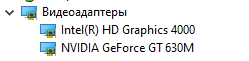
возникла критическая ошибка, которая привела к завершению работы JAVA VM. Чаще всего эти ошибки могут быть вызваны несовместимыми с игрой драйверами графики
# A fatal error has been detected by the Java Runtime Environment:
#
# EXCEPTION_ACCESS_VIOLATION (0xc0000005) at pc=0x00007ffe918b2d77, pid=4188, tid=0x0000000000001520
#
# JRE version: Java(TM) SE Runtime Environment (8.0_321-b07) (build 1.8.0_321-b07)
# Java VM: Java HotSpot(TM) 64-Bit Server VM (25.321-b07 mixed mode windows-amd64 compressed oops)
# Problematic frame:
# C [ig7icd64.dll+0x22d77]
#
# Failed to write core dump. Minidumps are not enabled by default on client versions of Windows
#
# An error report file with more information is saved as:
# C:UsersadminAppDataRoaming.redserverclientsRedPowerhs_err_pid4188.log
#
# If you would like to submit a bug report, please visit:
# http://bugreport.java.com/bugreport/crash.jsp
# The crash happened outside the Java Virtual Machine in native code.
# See problematic frame for where to report the bug.
#
# Exit code: 1
I am new at using Sonarqube and I have an issue that maybe you can help with.
I am working in a development project now that uses Jdk 8 update 261, so I have my environment variable JAVA_HOME pointing to it and I can not change it as suggested in other posts.
So I installed jdk 11 as you can see in this image:
installed jdks
And I edited my wrapper.conf to this:
wrapper.conf file
But still my sonarqube does not start. This is the log I get in my C:sonarqube-7.9.5logssonar file:
–> Wrapper Started as Console
Launching a JVM…
Unable to execute Java command. The system cannot find the specified file. (0x2)
“C:Program FilesJavajdk-11.0.4binjava.exe” -Dsonar.wrapped=true -Djava.awt.headless=true -Xms8m -Xmx32m -Djava.library.path="./lib" -classpath “…/…/lib/jsw/wrapper-3.2.3.jar;…/…/lib/common/activation-1.1.jar;…/…/lib/common/commons-codec-1.12.jar;…/…/lib/common/commons-csv-1.4.jar;…/…/lib/common/commons-dbcp2-2.5.0.jar;…/…/lib/common/commons-dbutils-1.5.jar;…/…/lib/common/commons-email-1.5.jar;…/…/lib/common/commons-io-2.6.jar;…/…/lib/common/commons-lang-2.6.jar;…/…/lib/common/commons-logging-1.2.jar;…/…/lib/common/commons-pool2-2.6.0.jar;…/…/lib/common/diffutils-1.2.jar;…/…/lib/common/elasticsearch-6.8.0.jar;…/…/lib/common/elasticsearch-cli-6.8.0.jar;…/…/lib/common/elasticsearch-core-6.8.0.jar;…/…/lib/common/elasticsearch-secure-sm-6.8.0.jar;…/…/lib/common/elasticsearch-x-content-6.8.0.jar;…/…/lib/common/gson-2.8.4.jar;…/…/lib/common/guava-18.0.jar;…/…/lib/common/hazelcast-3.12.1.jar;…/…/lib/common/hazelcast-client-3.12.1.jar;…/…/lib/common/HdrHistogram-2.1.9.jar;…/…/lib/common/hppc-0.7.1.jar;…/…/lib/common/httpclient-4.5.2.jar;…/…/lib/common/httpcore-4.4.4.jar;…/…/lib/common/jackson-annotations-2.9.0.jar;…/…/lib/common/jackson-core-2.9.8.jar;…/…/lib/common/jackson-databind-2.9.8.jar;…/…/lib/common/jackson-dataformat-cbor-2.9.8.jar;…/…/lib/common/jackson-dataformat-smile-2.9.8.jar;…/…/lib/common/jackson-dataformat-yaml-2.9.8.jar;…/…/lib/common/javax.mail-1.5.6.jar;…/…/lib/common/jaxb-api-2.3.0.jar;…/…/lib/common/jbcrypt-0.4.jar;…/…/lib/common/jjwt-api-0.10.5.jar;…/…/lib/common/jjwt-impl-0.10.5.jar;…/…/lib/common/jjwt-jackson-0.10.5.jar;…/…/lib/common/jna-4.5.1.jar;…/…/lib/common/joda-time-2.10.1.jar;…/…/lib/common/jopt-simple-5.0.2.jar;…/…/lib/common/jul-to-slf4j-1.7.25.jar;…/…/lib/common/log4j-api-2.8.2.jar;…/…/lib/common/log4j-to-slf4j-2.8.2.jar;…/…/lib/common/logback-access-1.2.3.jar;…/…/lib/common/logback-classic-1.2.3.jar;…/…/lib/common/logback-core-1.2.3.jar;…/…/lib/common/lucene-analyzers-common-7.7.0.jar;…/…/lib/common/lucene-backward-codecs-7.7.0.jar;…/…/lib/common/lucene-core-7.7.0.jar;…/…/lib/common/lucene-grouping-7.7.0.jar;…/…/lib/common/lucene-highlighter-7.7.0.jar;…/…/lib/common/lucene-join-7.7.0.jar;…/…/lib/common/lucene-memory-7.7.0.jar;…/…/lib/common/lucene-misc-7.7.0.jar;…/…/lib/common/lucene-queries-7.7.0.jar;…/…/lib/common/lucene-queryparser-7.7.0.jar;…/…/lib/common/lucene-sandbox-7.7.0.jar;…/…/lib/common/lucene-spatial-7.7.0.jar;…/…/lib/common/lucene-spatial-extras-7.7.0.jar;…/…/lib/common/lucene-spatial3d-7.7.0.jar;…/…/lib/common/lucene-suggest-7.7.0.jar;…/…/lib/common/lz4-1.3.0.jar;…/…/lib/common/mybatis-3.5.1.jar;…/…/lib/common/nanohttpd-2.3.0.jar;…/…/lib/common/netty-buffer-4.1.32.Final.jar;…/…/lib/common/netty-codec-4.1.32.Final.jar;…/…/lib/common/netty-codec-http-4.1.32.Final.jar;…/…/lib/common/netty-common-4.1.32.Final.jar;…/…/lib/common/netty-handler-4.1.32.Final.jar;…/…/lib/common/netty-resolver-4.1.32.Final.jar;…/…/lib/common/netty-transport-4.1.32.Final.jar;…/…/lib/common/okhttp-3.14.2.jar;…/…/lib/common/okio-1.17.2.jar;…/…/lib/common/parent-join-client-6.8.0.jar;…/…/lib/common/percolator-client-6.8.0.jar;…/…/lib/common/picocontainer-2.15.jar;…/…/lib/common/protobuf-java-3.7.0.jar;…/…/lib/common/slf4j-api-1.7.25.jar;…/…/lib/common/snakeyaml-1.17.jar;…/…/lib/common/sonar-ce-7.9.5.jar;…/…/lib/common/sonar-ce-common-7.9.5.jar;…/…/lib/common/sonar-ce-task-7.9.5.jar;…/…/lib/common/sonar-ce-task-projectanalysis-7.9.5.jar;…/…/lib/common/sonar-channel-4.1.jar;…/…/lib/common/sonar-check-api-7.9.5.jar;…/…/lib/common/sonar-classloader-1.0.jar;…/…/lib/common/sonar-core-7.9.5.jar;…/…/lib/common/sonar-db-core-7.9.5.jar;…/…/lib/common/sonar-db-dao-7.9.5.jar;…/…/lib/common/sonar-db-migration-7.9.5.jar;…/…/lib/common/sonar-duplications-7.9.5.jar;…/…/lib/common/sonar-main-7.9.5.jar;…/…/lib/common/sonar-markdown-7.9.5.jar;…/…/lib/common/sonar-plugin-api-7.9.5-all.jar;…/…/lib/common/sonar-plugin-api-7.9.5.jar;…/…/lib/common/sonar-process-7.9.5.jar;…/…/lib/common/sonar-scanner-protocol-7.9.5.jar;…/…/lib/common/sonar-server-7.9.5.jar;…/…/lib/common/sonar-server-common-7.9.5.jar;…/…/lib/common/sonar-update-center-common-1.18.0.487.jar;…/…/lib/common/sonar-ws-7.9.5.jar;…/…/lib/common/stax2-api-3.1.4.jar;…/…/lib/common/staxmate-2.0.1.jar;…/…/lib/common/t-digest-3.2.jar;…/…/lib/common/tomcat-annotations-api-8.5.38.jar;…/…/lib/common/tomcat-embed-core-8.5.38.jar;…/…/lib/common/transport-6.8.0.jar;…/…/lib/common/transport-netty4-client-6.8.0.jar;…/…/lib/common/woodstox-core-lgpl-4.4.0.jar;…/…/lib/sonar-application-7.9.5.jar;…/…/lib/sonar-shutdowner-7.9.5.jar” -Dwrapper.key=“PxSC6cpdcoyZnBC3” -Dwrapper.port=32000 -Dwrapper.jvm.port.min=31000 -Dwrapper.jvm.port.max=31999 -Dwrapper.pid=4596 -Dwrapper.version=“3.2.3” -Dwrapper.native_library=“wrapper” -Dwrapper.cpu.timeout=“10” -Dwrapper.jvmid=1 org.tanukisoftware.wrapper.WrapperSimpleApp org.sonar.application.App
Critical error: wait for JVM process failed
Can someone please help me?
Skip to content
На чтение 3 мин. Просмотров 4.3k. Опубликовано 03.09.2019
Неустранимая ошибка исключения виртуальной машины Java появляется у некоторых пользователей, когда они пытаются запустить программное обеспечение, построенное на Java. Полное сообщение об ошибке гласит: « Не удалось создать виртуальную машину Java. Ошибка: произошла фатальная исключительная ситуация. »Следовательно, Java-программа не запускается. Это несколько потенциальных исправлений для фатальной ошибки виртуальной машины Java.
Содержание
- Решения для исправления ошибок виртуальной машины Java
- 1. Установите новую системную переменную для Java
- 2. Выберите опцию Запуск от имени администратора для Java
- 3. Переустановите Java
Решения для исправления ошибок виртуальной машины Java
1. Установите новую системную переменную для Java
Ошибка виртуальной машины Java часто возникает, когда Java требуется больший глобальный максимальный размер кучи памяти. Пользователи исправили проблему, увеличив максимальный объем оперативной памяти, выделенной для Java. Пользователи могут сделать это, установив новую системную переменную Java следующим образом.
- Откройте «Выполнить» с помощью сочетания клавиш Windows + R.
- Введите «sysdm.cpl» в «Выполнить» и нажмите ОК , чтобы открыть окно на изображении непосредственно ниже.

- Выберите вкладку Advanced в этом окне.
- Нажмите кнопку Переменные среды , чтобы открыть окно ниже.

- Нажмите кнопку Создать под полем Системные переменные.
- Введите «_JAVA_OPTIONS» в текстовое поле «Имя переменной».

- Затем введите «–Xmx512M» в текстовом поле «Значение переменной», что увеличит объем оперативной памяти до 512 мегабайт.

- Нажмите кнопку ОК , чтобы закрыть окно.
- Затем нажмите кнопку ОК в окнах среды.
– СВЯЗАННО: Как удалить всплывающее окно «Обновление Java доступно»
2. Выберите опцию Запуск от имени администратора для Java
Ошибка виртуальной машины Java также может быть связана с недостаточными правами администратора. Таким образом, некоторым пользователям может потребоваться назначить права администратора для Java. Пользователи могут назначать права администратора для Java в Windows 10 следующим образом.
- Откройте Cortana с помощью сочетания клавиш Windows + Q.
- Введите «Java» в поле поиска.
- Затем щелкните правой кнопкой мыши Java и выберите Открыть местоположение файла , чтобы открыть папку Java в проводнике.

- Теперь пользователи могут щелкнуть правой кнопкой мыши файл java.exe и выбрать Свойства .

- Выберите вкладку «Совместимость».

- Выберите Запустить эту программу от имени администратора .
- Выберите параметр Применить .
- Нажмите ОК , чтобы закрыть окно.
3. Переустановите Java
- Переустановка Java может также исправить ошибку виртуальной машины Java для некоторых пользователей. Сначала удалите установленную версию Java, введя «appwiz.cpl» в «Выполнить» и нажав ОК .

- Введите «Java» в поле поиска.
- Выберите Java и нажмите Удалить .
- Нажмите Да в любом открывшемся окне подтверждения.
- После этого перезапустите Windows.
- Затем откройте страницу загрузки Java в браузере.

- Пользователям нужна 32-битная Java для 32-битных программ и 64-битная Java для 64-битного программного обеспечения. В случае сомнений лучше всего загрузить и установить обе версии Java, нажав Windows Offline и Windows Offline 64-bit .
- После этого откройте мастер установки Java.
- Нажмите кнопку Установить в мастере настройки.

Таким образом, пользователи могут исправить фатальную ошибку виртуальной машины Java. Эти разрешения обычно исправляют фатальную ошибку виртуальной машины Java, чтобы пользователи могли запускать необходимое программное обеспечение Java.
A runtime error in Java is an application error that occurs during the execution of a program. A runtime error occurs when a program is syntactically correct but contains an issue that is only detected during program execution. These issues cannot be caught at compile-time by the Java compiler and are only detected by the Java Virtual Machine (JVM) when the application is running.
Runtime errors are a category of exception that contains several more specific error types. Some of the most common types of runtime errors are:
- IO errors
- Division by zero errors
- Out of range errors
- Undefined object errors
Runtime Errors vs Compile-Time Errors
Compile-time errors occur when there are syntactical issues present in application code, for example, missing semicolons or parentheses, misspelled keywords or usage of undeclared variables.
These syntax errors are detected by the Java compiler at compile-time and an error message is displayed on the screen. The compiler prevents the code from being executed until the error is fixed. Therefore, these errors must be addressed by debugging before the program can be successfully run.
On the other hand, runtime errors occur during program execution (the interpretation phase), after compilation has taken place. Any code that throws a runtime error is therefore syntactically correct.
Runtime Errors vs Logical Errors
A runtime error could potentially be a legitimate issue in code, for example, incorrectly formatted input data or lack of resources (e.g. insufficient memory or disk space). When a runtime error occurs in Java, the compiler specifies the lines of code where the error is encountered. This information can be used to trace back where the problem originated.
On the other hand, a logical error is always the symptom of a bug in application code leading to incorrect output e.g. subtracting two variables instead of adding them. In case of a logical error, the program operates incorrectly but does not terminate abnormally. Each statement may need to be checked to identify a logical error, which makes it generally harder to debug than a runtime error.
What Causes Runtime Errors in Java
The most common causes of runtime errors in Java are:
- Dividing a number by zero.
- Accessing an element in an array that is out of range.
- Attempting to store an incompatible type value to a collection.
- Passing an invalid argument to a method.
- Attempting to convert an invalid string to a number.
- Insufficient space in memory for thread data.
When any such errors are encountered, the Java compiler generates an error message and terminates the program abnormally. Runtime errors don’t need to be explicitly caught and handled in code. However, it may be useful to catch them and continue program execution.
To handle a runtime error, the code can be placed within a try-catch block and the error can be caught inside the catch block.
Runtime Error Examples
Division by zero error
Here is an example of a java.lang.ArithmeticException, a type of runtime exception, thrown due to division by zero:
public class ArithmeticExceptionExample {
public static void main(String[] args) {
          int a = 10, b = 0;
          System.out.println("Result: "+ a/b);
    }
}
In this example, an integer a is attempted to be divided by another integer b, whose value is zero, leading to a java.lang.ArithmeticException:
Exception in thread "main" java.lang.ArithmeticException: / by zero
        at ArithmeticExceptionExample.main(ArithmeticExceptionExample.java:4)
Accessing an out of range value in an array
Here is an example of a java.lang.ArrayIndexOutOfBoundsExceptionthrown due to an attempt to access an element in an array that is out of bounds:
public class ValueOutOfRangeErrorExample {
    public static void main(String[] args) {
        int arr[] = new int[5];
        System.out.println("5th element in array: " + arr[5]);
    }
}
In this example, an array is initialized with 5 elements. An element at position 5 is later attempted to be accessed in the array, which does not exist, leading to a java.lang.ArrayIndexOutOfBoundsException runtime error:
Exception in thread "main" java.lang.ArrayIndexOutOfBoundsException: Index 5 out of bounds for length 5
    at ValueOutOfRangeErrorExample.main(ValueOutOfRangeErrorExample.java:4)
How to Solve Runtime Errors
Runtime errors can be handled in Java using try-catch blocks with the following steps:
- Surround the statements that can throw a runtime error in try-catch blocks.
- Catch the error.
- Depending on the requirements of the application, take necessary action. For example, log the exception with an appropriate message.
To illustrate this, the code in the earlier ArithmeticException example can be updated with the above steps:
public class ArithmeticExceptionExample {
    public static void main(String[] args) {
        try {
            int a = 10, b = 0;
            System.out.println("Result: " + a/b);
        } catch (ArithmeticException ae) {
            System.out.println("Arithmetic Exception: cannot divide by 0");
        }
        System.out.println("Continuing execution...");
    }
}
Surrounding the code in try-catch blocks like the above allows the program to continue execution after the exception is encountered:
Arithmetic Exception: cannot divide by 0
Continuing execution…
Runtime errors can be avoided where possible by paying attention to detail and making sure all statements in code are mathematically and logically correct.
Track, Analyze and Manage Errors With Rollbar

Managing errors and exceptions in your code is challenging. It can make deploying production code an unnerving experience. Being able to track, analyze, and manage errors in real-time can help you to proceed with more confidence. Rollbar automates error monitoring and triaging, making fixing errors easier than ever. Try it today.