
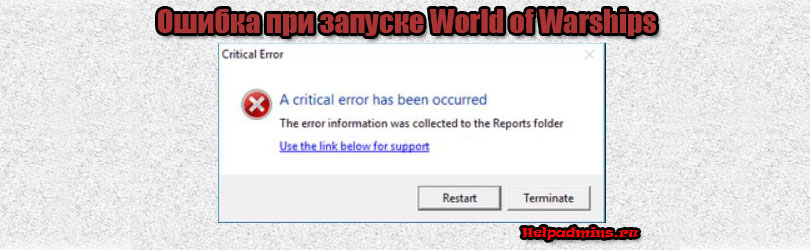
A critical error has been occurred в игре World of Warships. Как исправить?
Игра World of Warships считается довольно хорошо сбалансированной и оптимизированной в плане корректности своей работы. Но даже в ней некоторые пользователи сталкиваются с проблемами запуска. Одна из наиболее распространенных таких ошибок – A critical error has occurred. Появляется она, как правило, в момент нажатия на кнопку “Играть”, хотя не исключены случаи ее появления прямо во время игры.
В данной статье мы приведем несколько рабочих решений, которые помогут исправить эту проблему.
Некорректный файл preferences.xml
Первое, с чего стоит начать решать ситуацию с появляющейся ошибкой Critical Error Occurred это удаление файла preferences.xml из папки с игрой.
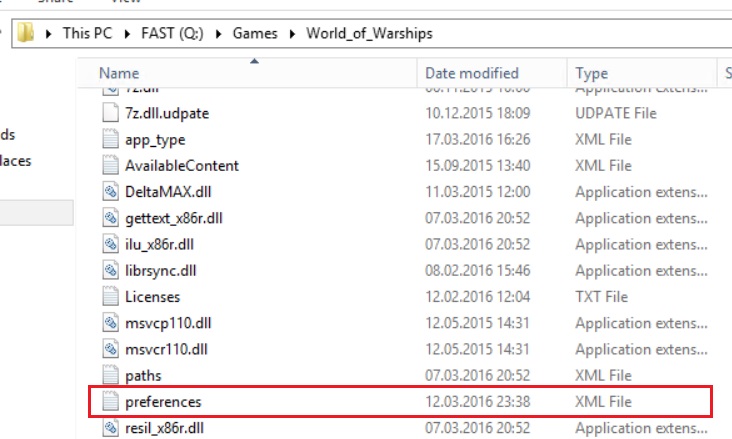
Файл файл preferences.xml
Дело в том, что этот файл содержит в себе некоторые параметры, влияющие на работу Critical Error Occurred. Удалив его и запустив игру, Вы сбросите все параметры этого файла на заводские.
Отключение масштабирования изображения
Если действия, описанные выше, не дали результата, то далее попробуйте деактивировать масштабирование изображения (оптимизацию во весь экран) в свойствах исполняемого файла WorldofWarships.
Для этого переходим в папку с игрой и находим в ней файл WorldofWarships.exe. Это тот файл на который ссылается ярлык на рабочем столе для запуска игры.
Жмем по нему правой кнопкой мыши и выбираем “Свойства”.
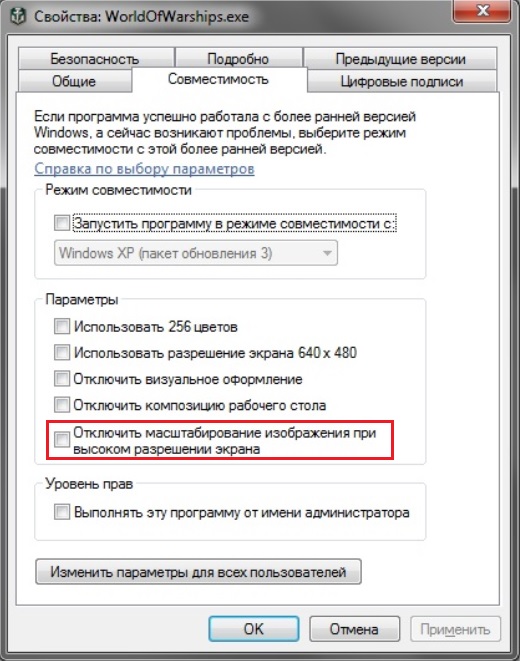
Отключение масштабирования
Далее переходим на вкладку “Совместимость” и находим пункт “Отключить оптимизацию во весь экран” или “Отключить оптимизацию полноэкранного режима” или “Отключить масштабирование изображения при высоком разрешении экрана”. В зависимости от версии Windows этот пункт может иметь разные названия.
Применяем и пробуем запускать.
Обновление драйвера видеокарты
Если ничего выше не помогло, то однозначно стоит попробовать обновить драйвера для своей видеокарты. Несмотря на то, что данный совет достаточно банален и распространен не стоит им пренебрегать. Очень много случаев, когда именно обновленные драйвера видеокарты помогали избавиться от ошибки Critical Error Occurred не только в игре World of Warships, но и в других популярных играх.
Лучшая благодарность автору — репост к себе на страничку:
- Why this happens
- How this happens
- How to resolve this issue
- AT YOUR OWN RISK — Alternative Solutions
Why this happens
World of Warships uses quite a bit of your Volatile memory, commonly called RAM.
- x86 OS (Windows XP 32bit, Windows Vista 32bit, Windows 7 32bit), have a maximum allowed virtual address space for an application of 2 GB RAM.
- x64 OS have a maximum allowed virtual address space for an application of 4 GB RAM.
- Computers with a low amount of RAM available may face issues to run the game reliably.
- With Update 0.8.1 32-Bit OS are no longer supported and can not run World of Warships!
- More details are available in a dedicated article.
How this happens
- You start the game and it loads from your Hard Drive to your RAM.
- You play a few battles and your RAM starts filling up.
- Your Computer runs out of free RAM space and the game crashes.
- About: Windows and Memory limits
- An error looking like the image below appears.

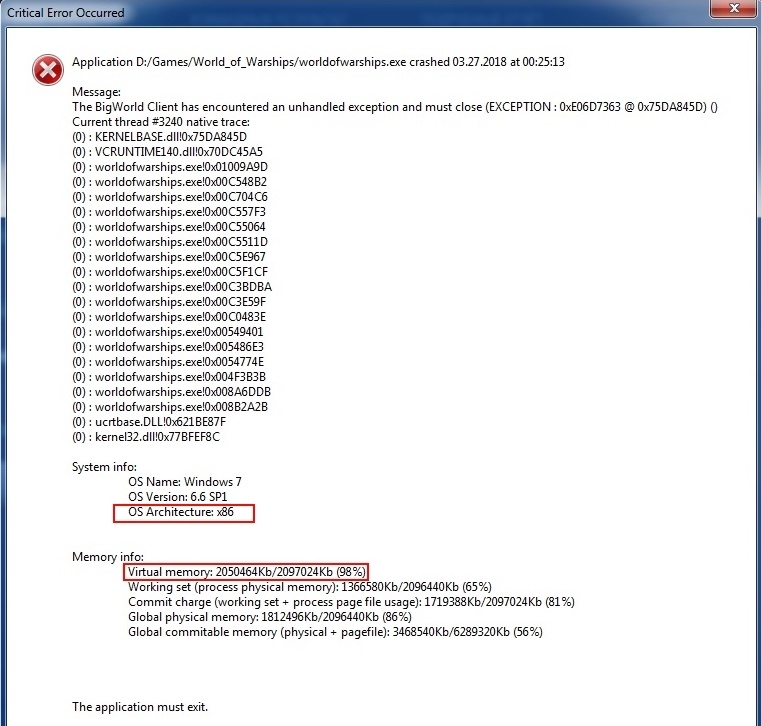
How to resolve this issue
- Should your computer have installed a x86 / 32 bits OS installed, you will need an OS upgrade to x64
- Refer to an IT Specialist before upgrading your OS.
- Verify your computer meets the minimum requirements. See amount of RAM required.
- Run the game in safe mode, with no mods.
AT YOUR OWN RISK — Alternative Solutions
Increasing the virtual address space for the process on Windows 7, 8, 8.1, 10 x86
- Run command line with administrator privileges:
- Open Start menu and type cmd
- Right click on the appeared cmd icon
- Choose «Run as administrator».
- Enter the following command in command line window:
- bcdedit /set increaseuserva 3072
- Reboot your computer.
Verify increase of virtual address space
- Run command line with administrator privileges:
- Open Start menu and type cmd,
- Right click on the appeared cmd icon
- Choose «Run as administrator».
- Enter the following command in command line window:
- bcdedit /enum | find «increaseuserva»
- If optimization flag exists you will be provided the following output:
- increaseuserva 3072
Rollback increase of virtual address space
- Run command line with administrator privileges:
- Open Start menu and type cmd,
- Right click on the appeared cmd icon
- Choose «Run as administrator».
- Enter the following command in command line window:
- bcdedit /deletevalue increaseuserva
- Reboot computer

Участник
9 публикаций
9 948 боёв

Участник
9 публикаций
9 948 боёв


Супертестер, Альфа-тестер, Коллекционер
1 988 публикаций
17 371 бой
Участник
9 публикаций
9 948 боёв
Супертестер, Альфа-тестер, Коллекционер
1 988 публикаций
17 371 бой
Участник
9 публикаций
9 948 боёв
Участник
5 948 публикаций
Гость
Участник
5 948 публикаций
Гость
Участник
9 публикаций
9 948 боёв
Участник
5 948 публикаций
Участник
9 публикаций
9 948 боёв
Участник
5 948 публикаций
Участник
9 публикаций
9 948 боёв
Участник
5 948 публикаций
Участник
9 публикаций
9 948 боёв



Участник, Коллекционер
2 568 публикаций
65 051 бой
Участник
9 публикаций
9 948 боёв
Эта тема закрыта для публикации новых ответов.
On 2/15/2020 at 6:17 PM, SnipeySnipes said:
Always nice when someone can use the search function. However, is there any more information you can give us as to the error like logs or screenshots? Shy of that, check out my troubleshooting guide. In this case, I would focus on Parts 1, 5, 7*, 10,13 and 14.
https://warshipnews.blog/2018/06/11/world-of-warships-and-win-10-troubleshooting-guide/
*-As noted in previous posts, delete the preferences.xml file usually found in C:GamesWorld_of_Warships. Also, if you have extensions hidden (which is default) you will NOT see the .xml so the file will just be called Preferences. If you are more comfortable knowing that the file is preferences.xml you can enable file extensions in Windows 10 by going to View on the file explorer and check the File name extensions box.
I’ve started getting this error as well. Uninstalled and reinstalled. Deleted preferences. Renamed preferences. Nothing seems to work.
It seems to happen in the Login phase. It gets past Game Loading, and hangs at the Login screen. If you try to restart, it crashes completely. At one point, it crashed the computer entirely.
I am not having connection issues with the internet in general. However, I have been disconnected from the game much more often since 10.0 came out. But multiple machines on the router work just fine, and this computer has no connection issues aside from WOWS. I’m usually on a wire, not on a WiFi connection. When I am on WiFi it’s a 5G connection.
The drive is actually new and there’s hardly anything on it yet.
BIOS were updated not too long ago, so I doubt it’s anything on that level. I doubt there’s a driver issue, but I’ll look into that again if it keeps up.
I don’t run any mods to the game.
The only thing I haven’t done is removed the battery from the laptop to try a cold reset.
Am I missing anything?
This happenes every single time I launch the game from STEAM. Since today’s patch.

Steps I’ve tried.
1. Restarting PC.
2. Verifying files on Steam.
3. Fully uninstalling and re-installing GPU drivers.
4. Verified disk health of all SSD’s in my machine.
5. Fully uninstalled and re-installed the game on a different drive.
6. Running Steam as administrator.
7. Running the game as an administrator directly from the .exe.
8. Ran extensive GPU benchmarks (FurMark & TimeSpy Extreme) to check the GPU isn’t acting up.
9. Waited out the entire 2h duration for Windows Memory Diagnostic to complete.
I do not have an anti-virus running and the game has an exception in the firewall.
Is there anything I have missed or am I crap out of luck? (Only happening on latest patch.)
Specs:
RTX 3090, 64GB DDR4, Ryzen 3950x.
Attached crash dump.