
SQL Server 2012 Developer SQL Server 2012 Enterprise SQL Server 2012 Standard Еще…Меньше
Номер ошибки: 187868 (Content Maintenance)VSTS: 1340145
Корпорация Майкрософт распространяет исправления Microsoft SQL Server 2012 в один загружаемый файл. Так как исправления являются накопительными, каждый выпуск содержит все исправления и все исправления безопасности, входившие в состав предыдущих 2012 SQL Server выпуска обновления.
Симптомы
Рассмотрим следующий сценарий:
-
Создайте хранимую процедуру, которая использует параметр табличное (TVP) в Microsoft SQL Server 2012.
-
С помощью профилировщика SQL или расширенных событий SQL Server запись RPC: запуск и RPC: завершена события.
-
Запустите запрос, который использует TVP.
-
Время ожидания запроса.
В этом случае выдается ошибка невыполненных планировщика и запросы, которые выполняются на тот же планировщик работать медленно. Кроме того мини-дамп файл создается в папке журнала SQL Server.
При возникновении этой проблемы появляется сообщение об ошибке, подобное приведенному ниже:
System.Data.SqlClient.SqlException (0x80131904): Время ожидания истекло. Время ожидания истекло до завершения операции или сервер не отвечает.
в System.Data.SqlClient.SqlInternalConnection.OnError (исключение SqlException, логическое breakConnection)
в System.Data.SqlClient.TdsParser.ThrowExceptionAndWarning()
в System.Data.SqlClient.TdsParserStateObject.ReadSniError (TdsParserStateObject stateObj, ошибка UInt32)
в System.Data.SqlClient.TdsParserStateObject.ReadSni (DbAsyncResult asyncResult, stateObj, TdsParserStateObject)
в System.Data.SqlClient.TdsParserStateObject.ReadNetworkPacket()
в System.Data.SqlClient.TdsParserStateObject.ReadByte()
в System.Data.SqlClient.TdsParser.Run (RunBehavior runBehavior, SqlCommand cmdHandler, преобразование SqlDataReader, BulkCopySimpleResultSet bulkCopyHandler, stateObj, TdsParserStateObject)
в System.Data.SqlClient.SqlCommand.FinishExecuteReader (SqlDataReader ds, RunBehavior runBehavior, resetOptionsString строка)
в System.Data.SqlClient.SqlCommand.RunExecuteReaderTds (CommandBehavior cmdBehavior, RunBehavior runBehavior, returnStream типа Boolean, логическое async)
в System.Data.SqlClient.SqlCommand.RunExecuteReader (CommandBehavior cmdBehavior, RunBehavior runBehavior, returnStream типа Boolean, строки метод, результат DbAsyncResult)
в System.Data.SqlClient.SqlCommand.InternalExecuteNonQuery (DbAsyncResult результат, имя_метода строка, логическое sendToPipe)
в System.Data.SqlClient.SqlCommand.ExecuteNonQuery()
в TVPApp.Program.Main (String [] args)
В журнале ошибок SQL Server регистрируется ошибка планировщика невыполненных вместе с сообщение об ошибке, подобное приведенному ниже:
< Дата >< время > с использованием сервера «dbghelp.dll» версия «4.0.5»
Сервер времени > < Дата >< *** не удается получить контекст потока для spid #
<Date><Time> Server * *******************************************************************************
Сервер времени > < Дата >< *
Сервер времени > < Дата >< * начало стека:
Сервер времени > < Дата >< * spid время > < Дата >< #
Сервер времени > < Дата >< *
Сервер времени > < Дата >< * невыполненных планировщика
Сервер времени > < Дата >< *
<Date><Time> Server * *******************************************************************************
< Дата >< время > сервер подпись стека для дампа является 0x000000000000002C
< Дата >< внешнего сервера времени > дамп процесса возврата кода 0x20000001.
Внешние дамп процесса возвращается без ошибок.
Процесс сервера < Дата >< время > 0:0:0 (0x1670) работника 0x0000000004EDE160 кажется невыполненных планировщика 5. Время создания потока: 13014210386757. Используется около поток ЦП: ядра 0 мс, г-жа пользователя 70106 процесс использования 16%. 77% Бездействие системы. Интервал: 70140 мс.
Процесс сервера < Дата >< время > 0:0:0 (0x1670) работника 0x0000000004EDE160 кажется невыполненных планировщика 5. Время создания потока:
Причина
Эта проблема возникает из-за ошибки в ядре СУБД SQL Server 2012. Текстовые столбцы TVP, реализуются в качестве вставки строк или буферов и увеличение числа строк увеличивается количество буферов. Тем не менее процесс, который освобождает буферы занимает много времени. Таким образом, не давая планировщик ошибка при выпуске и сжатие операций происходят.
Примечание. Как проблема была устранена в следующей статье базы знаний Майкрософт. Однако в накопительный пакет обновления, описанного в статье не для ошибки времени ожидания запроса.
ИСПРАВИТЬ 2520808 : ошибка планировщика невыполненных при выполнении запроса, который использует TVP в SQL Server 2008 или SQL Server 2008 R2 при использовании профилировщика SQL или расширенных событий SQL Server
Решение
Информация о накопительном пакете обновления
Накопительный пакет обновления 5 для SQL Server 2012 Пакет обновления 1 (SP1)
Исправление этой уязвимости первого выпуска накопительного обновления 5. Дополнительные сведения о том, как получить этот накопительный пакет обновления для SQL Server 2012, щелкните следующий номер статьи базы знаний Майкрософт:
2861107 накопительного обновления 5 для SQL Server 2012Примечание. Поскольку построения являются накопительными, каждый новый выпуск исправление содержит все исправления и все исправления, входившие в состав предыдущих 2012 SQL Server исправления выпуска. Мы рекомендуем рассмотреть применение последнего выпуска исправления, содержащего это исправление. Для получения дополнительных сведений щелкните следующий номер статьи базы знаний Майкрософт:
2772858 SQL Server 2012 выполняется построение, выпущенных после выпуска SQL Server 2012 Пакет обновления 1
Временное решение
Чтобы обойти эту проблему, воспользуйтесь одним из следующих методов:
-
Не используйте SQL Profiler или расширенными событиями SQL Server.
-
Снимите флажок RPC: запуск и RPC: завершена флажки в определении трассировки.
Дополнительные сведения
Это исправление не применяется к SQL Server 2008 или SQL Server 2008 R2 при публикации эту статью. Если все пользователи сталкиваются с этой проблеме в SQL Server 2008 или SQL Server 2008 R2 даже после установки пакета, как описано в следующей статье, проверить в случае тайм-аута запроса и определить, можно ли разрешить тайм-аута. В противном случае отправьте запрос для исправления для SQL Server 2008 или SQL Server 2008 R2.
ИСПРАВИТЬ 2520808 : ошибка планировщика невыполненных при выполнении запроса, который использует TVP в SQL Server 2008 или SQL Server 2008 R2 при использовании профилировщика SQL или расширенных событий SQL Server
Сведения о стеке вызова
sqlmin!CLinkedMap<__int64,CCheckReadersAndWriters::CCounts>::FLookup+0x29sqlmin!CCheckReadersAndWriters::Release+0x69
sqlmin!CMainIlb::{dtor}+0x3d
sqlmin!CMainIlb::`scalar deleting destructor'+0x3d
sqlmin!CBlobHandleFactoryMain::ReleaseILockBytes+0x13
sqlmin!CMainIlb::Release+0xf0
sqllang!CTraceRpcBinaryStream::~CTraceRpcBinaryStream+0x80
sqllang!CTraceTvpData::{dtor}+0x14
sqllang!CTraceTvpData::`scalar deleting destructor'+0x1e
sqllang!CRpcTraceHelper::CleanUpTraceTvpData+0x33
sqllang!CRpcTraceHelper::~CRpcTraceHelper+0x70
sqllang!CRPCExecEnv::~CRPCExecEnv+0x2ab
sqllang!CRPCExecEnv::`scalar deleting destructor'+0x14
sqllang!process_request+0x10b1
sqllang!process_commands+0x51c
sqldk!SOS_Task::Param::Execute+0x21e
sqldk!SOS_Scheduler::RunTask+0xa8
sqldk!SOS_Scheduler::ProcessTasks+0x299
sqldk!SchedulerManager::WorkerEntryPoint+0x261
sqldk!SystemThread::RunWorker+0x8f
sqldk!SystemThreadDispatcher::ProcessWorker+0x3c8
sqldk!SchedulerManager::ThreadEntryPoint+0x236
kernel32!BaseThreadInitThunk+0xd
ntdll!RtlUserThreadStart+0x1d
sqlmin!CLinkedMap<__int64,CCheckReadersAndWriters::CCounts>::FDelete+0x34sqlmin!CCheckReadersAndWriters::Release+0xfb
sqlmin!CMainIlb::{dtor}+0x3d
sqlmin!CMainIlb::`scalar deleting destructor'+0x3d
sqlmin!CBlobHandleFactoryMain::ReleaseILockBytes+0x13
sqlmin!CMainIlb::Release+0xf0
sqllang!CTraceRpcBinaryStream::~CTraceRpcBinaryStream+0x80
sqllang!CTraceTvpData::{dtor}+0x11
sqllang!CRpcTraceHelper::CleanUpTraceTvpData+0x55
sqllang!CRpcTraceHelper::TracePostExec+0x1bf
sqllang!CRPCExecEnv::OnExecFinish+0xaa
sqllang!CProtocolHeaderInfo::{dtor}+0xffffffff`ffb158e2
sqllang!process_request+0x764
sqllang!process_commands+0x51c
sqldk!SOS_Task::Param::Execute+0x21e
sqldk!SOS_Scheduler::RunTask+0xa8
sqldk!SOS_Scheduler::ProcessTasks+0x29a
sqldk!SchedulerManager::WorkerEntryPoint+0x261
sqldk!SystemThread::RunWorker+0x8f
sqldk!SystemThreadDispatcher::ProcessWorker+0x3c8
sqldk!SchedulerManager::ThreadEntryPoint+0x236
kernel32!BaseThreadInitThunk+0x1a
ntdll!RtlUserThreadStart+0x1d
Статус
Корпорация Майкрософт подтверждает, что это проблема продуктов Майкрософт, перечисленных в разделе «Относится к».
Author: jannaw
Writer: v-yipli
Технический редактор: pradm; jannaw; hozhan
Editor: v-mordew
Нужна дополнительная помощь?
Нужны дополнительные параметры?
Изучите преимущества подписки, просмотрите учебные курсы, узнайте, как защитить свое устройство и т. д.
В сообществах можно задавать вопросы и отвечать на них, отправлять отзывы и консультироваться с экспертами разных профилей.

Здравствуйте уважаемые. Скажите пожалуйста, можно ли изменить пароль NT ServiceSQLSERVERAGENT. Если да то как и где?
Собственно есть организация друга, которую обслуживал аутсорсинг. Договор с ними расторгли и через пару дней перестали делаться архивы баз. Где-то копаясь по журналам увидел, что «при попытке входа NT ServiceSQLSERVERAGENT произошла ошибка, не верный пароль» или что-то в этом виде.
При запуске плана обслуживания вот такая ошибка.
Сообщение
Выполняется от имени пользователя: NT ServiceSQLSERVERAGENT.Программа выполнения пакетов Microsoft (R) SQL Server Version 11.0.2100.60 for 64-bit (C) Корпорация Майкрософт (Microsoft Corporation). Все права защищены. Начало: 18:26:53 Ошибка: 2018-10-11 18:26:55.03 Код: 0xC00291EC Источник: {E9E1C770-410A-49A4-9D5A-D7972FBE7A6D} Задача «Выполнение SQL» Описание: Сбой выделения соединения «Соединение с локальным сервером». Возможно, соединение настроено неправильно или отсутствуют разрешения, необходимые для этого соединения. Конец ошибки Предупреждение: 2018-10-11 18:26:55.06 Код: 0x80019002 Источник: OnPreExecute Описание: Код предупреждения служб SSIS: DTS_W_MAXIMUMERRORCOUNTREACHED. Метод Execution завершен успешно, но число возникших ошибок (1) достигло максимально допустимого (1), что привело к сбою. Это происходит, когда количество ошибок достигает значения, определенного в свойстве MaximumErrorCount. Измените свойство MaximumErrorCount или устраните ошибки. Конец предупреждения Ошибка: 2018-10-11 18:26:55.08 Код: 0xC0024104 Источник: Задача «Очистка после обслуживания» Описание: Сбой метода Execute в задаче, возвращен код ошибки 0x80131904 (Ошибка входа пользователя «sa».). Метод Execute должен завершиться успешно и показать результат, используя параметр «out». Конец ошибки Ошибка: 2018-10-11 18:26:55.10 Код: 0xC0024104 Источник: {87566C7E-2D9F-4AAB-BD6D-89673EA80637} Описание: Сбой метода Execute в задаче, возвращен код ошибки 0x80131904 (Ошибка входа пользователя «sa».). Метод Execute должен завершиться успешно и показать результат, используя параметр «out». Конец ошибки Предупреждение: 2018-10-11 18:26:55.10 Код: 0x80019002 Источник: OnPostExecute Описание: Код предупреждения служб SSIS: DTS_W_MAXIMUMERRORCOUNTREACHED. Метод Execution завершен успешно, но число возникших ошибок (2) достигло максимально допустимого (1), что привело к сбою. Это происходит, когда количество ошибок достигает значения, определенного в свойстве MaximumErrorCount. Измените свойство MaximumErrorCount или устраните ошибки. Конец предупреждения DTExec: завершено исполнение пакетаDTSER_FAILURE (1). Начало: 18:26:53 Готово: 18:26:55 Прошло:1.328 секунд. Не удалось выполнить пакет. Шаг завершился с ошибкой.
Добавлено через 1 минуту
Прошу сильно не ругать и не пинать тапками, в 1с и sql я не силен. SQL Server 2012
I am seeing this in several situations and it is intermittent in our web based application connecting to SQL Server 2008 R2 serve back end. Users are coming across a point 2 point connection and seeing this on and off. Thought it was bandwidth issues until I started seeing it on terminal servers that are on the same core switch as this SQL server. I have checked remote connection enabled, Port 1433 is set correctly in Configuration for TCP/IP and the only thing I see that could be a cause is the timeout setting is set to 100000 in the remote connections rather than unlimited.
System.Data.SqlClient.SqlException (0x80131904):
A network-related or instance-specific error occurred while establishing a connection to SQL Server. The server was not found or was not accessible. Verify that the instance name is correct and that SQL Server is configured to allow remote connections. (provider: Named Pipes Provider, error: 40 — Could not open a connection to SQL Server)
System.ComponentModel.Win32Exception (0x80004005): The network path
was not found
at System.Data.SqlClient.SqlInternalConnection.OnError(SqlException exception, Boolean breakConnection, Action1 wrapCloseInAction) at System.Data.SqlClient.TdsParser.ThrowExceptionAndWarning(TdsParserStateObject stateObj, Boolean callerHasConnectionLock, Boolean asyncClose) > at System.Data.SqlClient.TdsParser.Connect(ServerInfo serverInfo, SqlInternalConnectionTds connHandler, Boolean ignoreSniOpenTimeout, Int64 timerExpire, Boolean encrypt, Boolean trustServerCert, Boolean integratedSecurity, Boolean withFailover) at System.Data.SqlClient.SqlInternalConnectionTds.AttemptOneLogin(ServerInfo serverInfo, String newPassword, SecureString newSecurePassword, Boolean ignoreSniOpenTimeout, TimeoutTimer timeout, Boolean withFailover) at System.Data.SqlClient.SqlInternalConnectionTds.LoginNoFailover(ServerInfo serverInfo, String newPassword, SecureString newSecurePassword, Boolean redirectedUserInstance, SqlConnectionString connectionOptions, SqlCredential credential, TimeoutTimer timeout) at System.Data.SqlClient.SqlInternalConnectionTds.OpenLoginEnlist(TimeoutTimer timeout, SqlConnectionString connectionOptions, SqlCredential credential, String newPassword, SecureString newSecurePassword, Boolean redirectedUserInstance) at System.Data.SqlClient.SqlInternalConnectionTds..ctor(DbConnectionPoolIdentity identity, SqlConnectionString connectionOptions, SqlCredential credential, Object providerInfo, String newPassword, SecureString newSecurePassword, Boolean redirectedUserInstance, SqlConnectionString userConnectionOptions, SessionData reconnectSessionData) at System.Data.SqlClient.SqlConnectionFactory.CreateConnection(DbConnectionOptions options, DbConnectionPoolKey poolKey, Object poolGroupProviderInfo, DbConnectionPool pool, DbConnection owningConnection, DbConnectionOptions userOptions) at System.Data.ProviderBase.DbConnectionFactory.CreatePooledConnection(DbConnectionPool pool, DbConnection owningObject, DbConnectionOptions options, DbConnectionPoolKey poolKey, DbConnectionOptions userOptions) at System.Data.ProviderBase.DbConnectionPool.CreateObject(DbConnection owningObject, DbConnectionOptions userOptions, DbConnectionInternal oldConnection) at System.Data.ProviderBase.DbConnectionPool.UserCreateRequest(DbConnection owningObject, DbConnectionOptions userOptions, DbConnectionInternal oldConnection) at System.Data.ProviderBase.DbConnectionPool.TryGetConnection(DbConnection owningObject, UInt32 waitForMultipleObjectsTimeout, Boolean allowCreate, Boolean onlyOneCheckConnection, DbConnectionOptions userOptions, DbConnectionInternal& connection) at System.Data.ProviderBase.DbConnectionPool.TryGetConnection(DbConnection owningObject, TaskCompletionSource1 retry, DbConnectionOptions
userOptions, DbConnectionInternal& connection) at
System.Data.ProviderBase.DbConnectionFactory.TryGetConnection(DbConnection
owningConnection, TaskCompletionSource1 retry, DbConnectionOptions userOptions, DbConnectionInternal oldConnection, DbConnectionInternal& connection) at System.Data.ProviderBase.DbConnectionInternal.TryOpenConnectionInternal(DbConnection outerConnection, DbConnectionFactory connectionFactory, TaskCompletionSource1 retry, DbConnectionOptions userOptions) at
System.Data.ProviderBase.DbConnectionClosed.TryOpenConnection(DbConnection
outerConnection, DbConnectionFactory connectionFactory,
TaskCompletionSource1 retry, DbConnectionOptions userOptions) at System.Data.SqlClient.SqlConnection.TryOpenInner(TaskCompletionSource1
retry) at
System.Data.SqlClient.SqlConnection.TryOpen(TaskCompletionSource1 retry) at System.Data.SqlClient.SqlConnection.Open() at System.Data.Entity.SqlServer.DefaultSqlExecutionStrategy.<>c__DisplayClass1.b__0() at System.Data.Entity.SqlServer.DefaultSqlExecutionStrategy.Execute[TResult](Func1
operation) at
System.Data.Entity.SqlServer.DefaultSqlExecutionStrategy.Execute(Action
operation) at
System.Data.Entity.Core.EntityClient.EntityConnection.Open()
ClientConnectionId:00000000-0000-0000-0000-000000000000
- Remove From My Forums
-
Question
-
Message from Job Step that executes an SSIS
2012 package:Failed to execute IS server package because of error 0x80131904. Server: XCDEV4, Package path: SSISDBAggCacheAggregateCacheMaintParallelCacheMaintSites.dtsx, Environment reference Id: NULL.
Description: .NET Framework execution was aborted. Another query caused the AppDomain SSISDB.dbo[runtime].5 to be unloaded.The package, thankfully, continued on for over 40 hours and appears to have successfully completed its task.
Can anyone tell me what the message means, what I need to do to have it never recur and any other recommendations in regards to it, please?
SQL2012RTM EE on Win2008R2 Server 64-bit.
-
Edited by
Tuesday, April 17, 2012 4:53 PM
-
Edited by
Answers
-
Memory is at 16GB for a 4-logical-CPU VM. There may have been an actual hardware issue as one of the memory chips went bad on us on Friday and a disk drive in the RAID array also went bad that day! The memory and disk weren’t fixed until Sunday
— the package having run to completion on Saturday.I’ve since modified the package and it now runs without the original, worrisome, error, on the same machine, invoking the same code (SPs), on even more data. It now completes the job step without errors. Very strange!
I don’t think there’s an actual answer here with regards to memory pressure — the VM was only running the package and intermittently pulling raw data from Production (about 5m rows per day). I already set the memory limit to 14GB for SQL 2012 of the
16GB available, BTW.Running the free Insight8 tool (highly recommended, very highly!), I can see memory usage is constant at 98%. That’s high BUT memory paging is at 7 pages per second MAX, frequently there’s absolutely ZERO paging going on, so IMO, memory
is configured just fine.-
Proposed as answer by
Koen VerbeeckMVP
Wednesday, April 18, 2012 7:19 PM -
Marked as answer by
SAinCA
Wednesday, April 18, 2012 7:30 PM -
Edited by
SAinCA
Wednesday, April 18, 2012 11:09 PM
-
Proposed as answer by
Discover expert solutions that worked for others
by Kazim Ali Alvi
Kazim has always been fond of technology, be it scrolling through the settings on his iPhone, Android device, or Windows. And at times, unscrewing the device to take… read more
Updated on May 12, 2023
Reviewed by
Alex Serban

After moving away from the corporate work-style, Alex has found rewards in a lifestyle of constant analysis, team coordination and pestering his colleagues. Holding an MCSA Windows Server… read more
- The 0x80131904 prevents users from signing in and has been a major concern for administrators.
- It generally appears when incorrect credentials are provided, or the firewall is blocking the connection.
- To fix things, check for network issues, verify firewall rules, or change the DNS entries, amongst other solutions.
XINSTALL BY CLICKING THE DOWNLOAD FILE
This software will repair common computer errors, protect you from file loss, malware, hardware failure and optimize your PC for maximum performance. Fix PC issues and remove viruses now in 3 easy steps:
- Download Restoro PC Repair Tool that comes with Patented Technologies (patent available here).
- Click Start Scan to find Windows issues that could be causing PC problems.
- Click Repair All to fix issues affecting your computer’s security and performance
- Restoro has been downloaded by 0 readers this month.
Administrators creating applications using a SQL connection don’t usually face many issues if the backend is tight. But often, due to misconfigurations or network issues, users come across the 0x80131904 error.
The message reads, A transport-level error has occurred when receiving results from the server. (provider: TCP Provider, error: 0 – The specified network name is no longer available.). It’s not something regular users can fix, and administrators, too, have a tough time dealing with it. Let’s find out more!
What is component error code 0x80131904?
The error usually has to do with a network-related issue, but if the problem persists, it could be settings to blame. More so, for some administrators, only a handful of users encountered the 0x80131904 error, while others could easily access things.
Here are a few reasons you are encountering the error:
- Incorrect credentials: When a user enters incorrect credentials, the error message may appear. So you will have to verify that.
- Firewall blocking the connection: In some cases, a firewall was blocking the connection, and it could be both, the one on the server’s side as well as the user’s end. For the latter, you can easily disable the firewall.
- Network issues: Some administrators found that it was a network issue triggering the error, and things automatically resolved in a short while.
- Misconfigured SQL settings: For a few, the server properties were misconfigured, or the security settings were not optimal, which led to the error.
How do I fix error 0x80131904?
Before we move to the slightly complex solutions, check these aspects first:
- Verify that the user is not entering incorrect credentials to access the application.
- Check for network issues and talk to the service provider for an update on it.
- Make sure the firewall is not blocking the connection. You can disable it temporarily to verify the same.
If none work, head to the fixes listed next.
1. Change the DNS entries
- Press Windows + E to open File Explorer, paste the following path in the address bar, and hit Enter:
C:/Windows/System32/Drivers/ETC
- Now, change the DNS entries in the hosts.ini file.
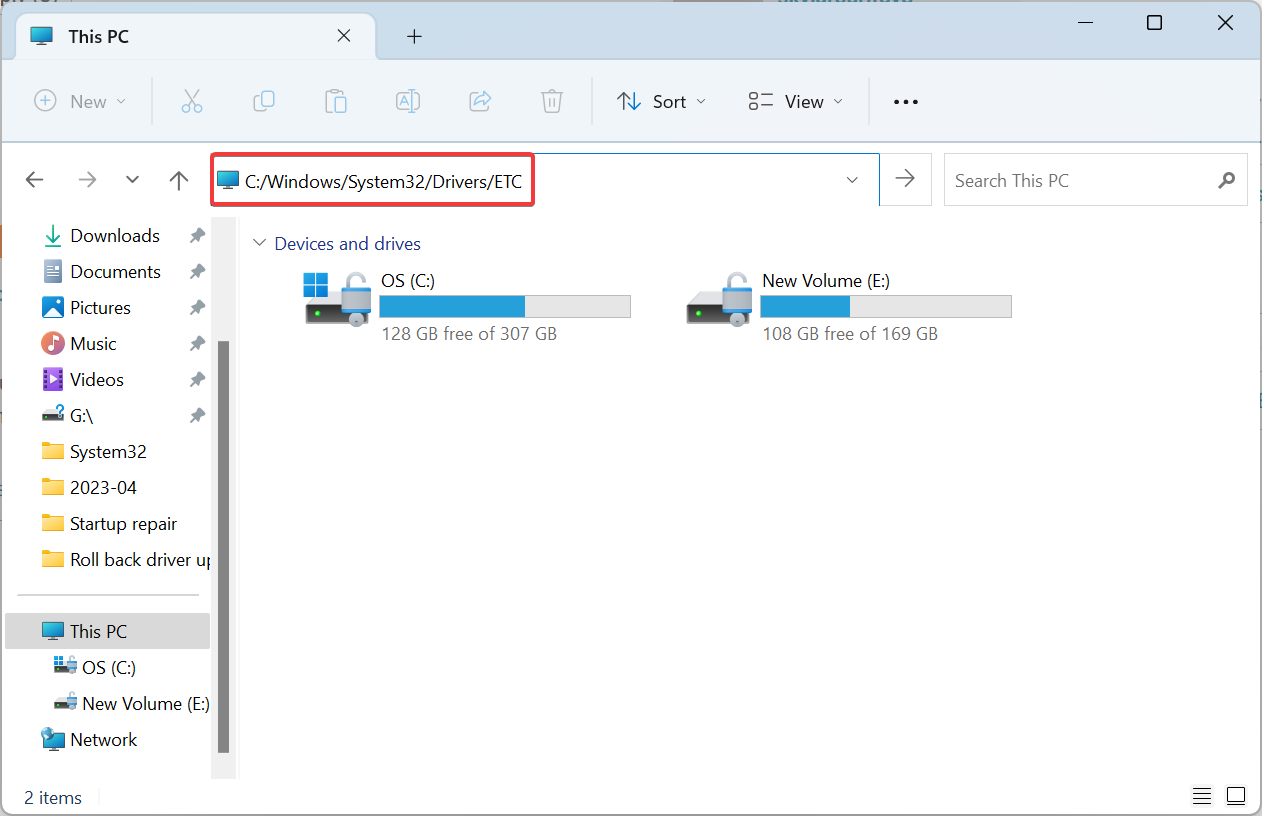
An administrator shared that changing the DNS entries fixed things when only a single user was unable to access the server while others could. Whether or not that’s the case with you, do try this first.
2. Reconfigure server authentication setting
- Open the Server Properties and select Security from the navigation pane.

- Now, under Server authentication, choose SQL server with Windows Authentication mode, and click OK to save the changes.

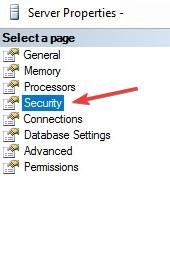
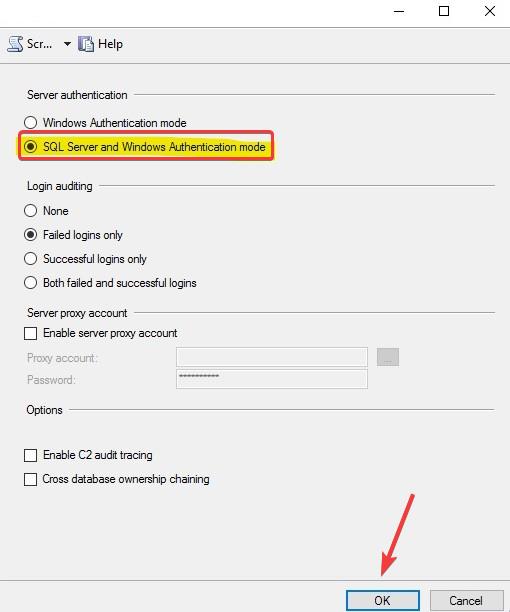
In some cases, the server’s security settings were be to blame for the 0x80131904: login failed error, and reconfiguring Server authentication to SQL Server and Windows Authentication mode got things running.
3. Downgrade the SQL client package
For many, the problem appeared after updating to a newer SQLClient package, which points to a bug in it. And in this case, you should downgrade to the previous one.
For instance, a user reported the issue after upgrading to 2.0.0 from 1.1.3 and reverting the change fixed things in no time.
- YouTube Spacebar Pause not Working? Here’s What to do
- Fix: We Can’t Sign You With This Credential [Domain Error]
- Error 2001: How to Fix This IRS Code in Few Steps
4. Remove problematic suites
If nothing else worked, you could remove the following two cipher suites from the client list:TLS_DHE_RSA_WITH_AES_256_GCM_SHA384 TLS_DHE_RSA_WITH_AES_128_GCM_SHA256
This has worked for many users, but remember to check if a patch has been released for the problem before making changes to fix 0x80131904.
Before you leave, check some quick tips to increase the Internet speed in Windows.
For any queries or to share what worked for you, drop a comment below.
Still having issues? Fix them with this tool:
SPONSORED
If the advices above haven’t solved your issue, your PC may experience deeper Windows problems. We recommend downloading this PC Repair tool (rated Great on TrustPilot.com) to easily address them. After installation, simply click the Start Scan button and then press on Repair All.
