
Главная Сброс счетчика и барабана Konica-Minolta C220/C223
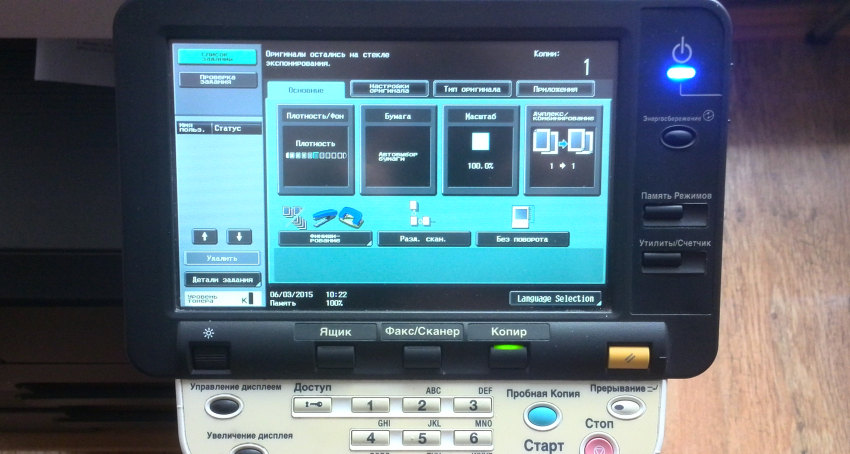
Если требуется сбросить счетчик аппарата, пробег, или устранить ошибки — это руководство для вас!
Включаем аппарат.
1. Жмем Утилиты/Счётчик —> Счётчик аппарата —> Проверка деталей
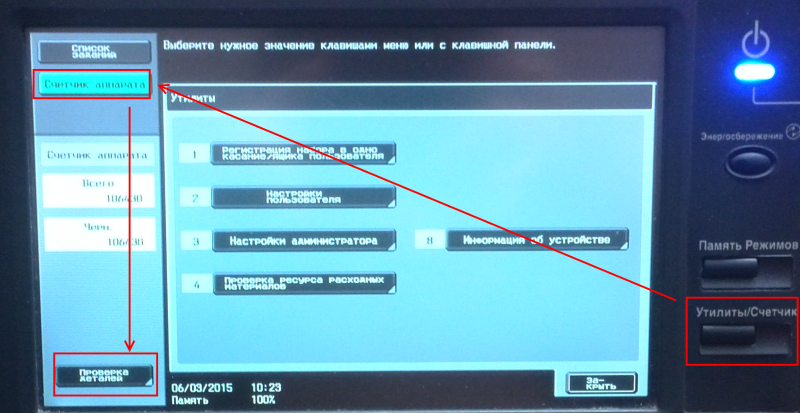
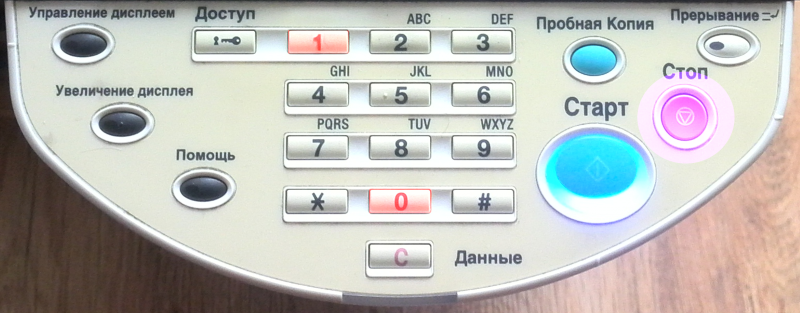
2. Видим «Утилиты». Нажимаем Стоп — Ноль — Ноль — Стоп— Ноль— Один.
Видим вот этот экран:
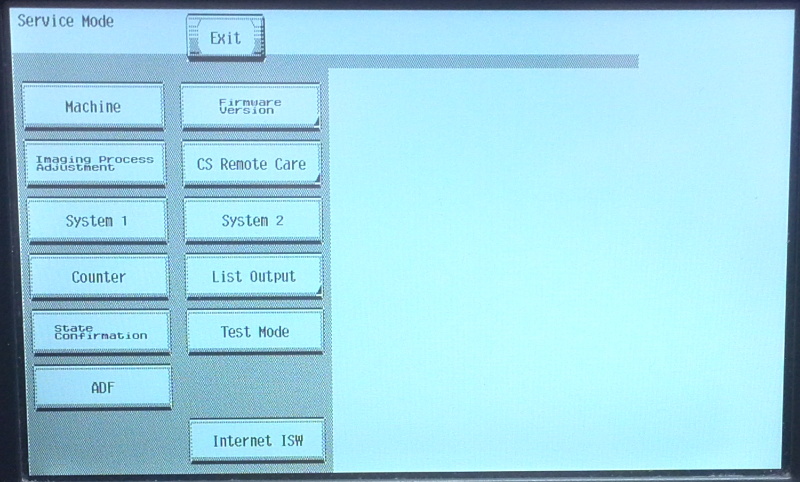
3. Жмем Counter (Счётчик) —— Counter Reset (Сброс счётчика) — выбираем нужное — Counter Of Each Mode (Все счётчики, кроме пробега барабана), Life (пробег фотовала, и т. д.) Warning (Предупреждения — сброс ошибок)
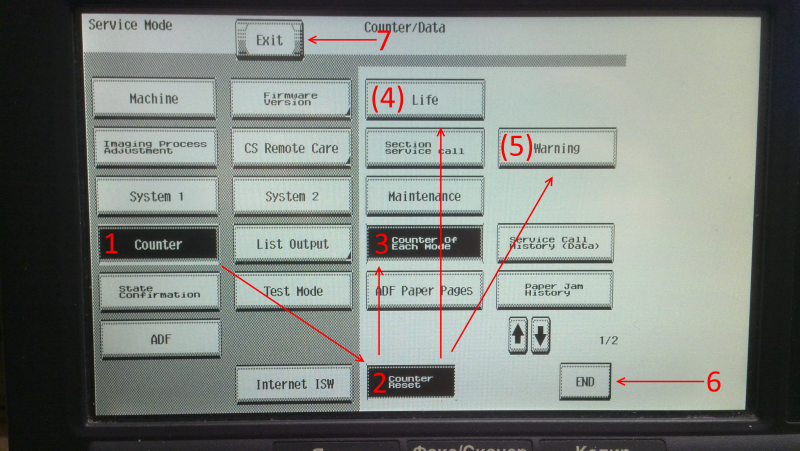
Выбираем нужное, жмем END и Exit. Все, аппаратом можно пользоваться дальше!
The life of the fusing unit will end when it reached the specified limit. The fusing unit (PN: A0P0R73366) has a life of 570K life. We are sharing the methods to solve the error, so check it out until it gets solved.

Here in this post, I explain how to reset Fusing unit life message on Konica Minolta bizhub C224, C224e, C284, C284e, C364, C364e. In this article, we are introducing the method to reset this error code. We are sharing the methods to solve the error, so check it out until it gets solved.
The maintenance sign means that the copier needs to be well serviced and checked if something is to be replaced. Consumables such as Toner, Drum, Blade, Fuser rollers, Pickup roller, and Developer are changed at such times. And also check the changing consumables are original or not. Always use spares having good quality. If you are sure that you have replaced the correct part or nothing is to be replaced, after ensuring these things, you can proceed to clear the sign. Always call experienced technicians for service.
Meaning of fusing unit replaced error
This error code usually comes due to its life-ending. The life of the fusing unit will end when it reached the specified limit. The fusing unit (PN: A0P0R73366) has a life of 570K life. When it reached the limit the error code will be shown in your machine. You must replace the fusing unit for the smooth functioning of your machine. If you are resetting the indication without replacing the fuser unit, there are some possibilities to show complaints such as paper jamming, copy line, etc. by the machine.
Method to reset fusing unit indication
- Press the «Utility» button.
- Then touch the counter shown on display. Then select Details.
- Then press «stop 00 stop 01» Now you are in service mode.
- Then go to «counters» then to «life», then «New release». Open the front door, not the door of toner.
- Select «fuser».
- Press the «Start» button.
- Then Exit.
I hope this was helpful, don’t forget to share it via any of the share buttons on this page are highly welcomed as well.
 Thanks: 0
 Likes: 0
 Dislikes: 0
-
04-07-2015
#1

Technician
- Rep Power
- 18
C224 — Factory Reset
Hi Guys,
Just a quick one, I don’t suppose there is a magical way of Factory Resetting these devices is there (I don’t mean Counter). We have picked up a used C224 from a Dealer and it’s all setup to them inc. their own imagery on the startup screen.
Obviously I could flash the firmware, but I’m worried about receiving the dreaded «Licence Management Error» afterwards.
Thanks in advance to anyone who has any ideas.
Thanks
Andy
-
04-07-2015
#2
Re: C224 — Factory Reset
Format the HDD and initialize data if necessary. Reload firmware. let me know if that works. These machine does not give license management error they stop working, you will be safe to do these things.
hop that works.
-
04-08-2015
#3
Re: C224 — Factory Reset
You can easily restore the KM boot screen logo by holding down the yellow reset button while powering on the machine, at the next screen choose delete boot screen logo.
-
04-08-2015
#4
Technician
- Rep Power
- 18
Re: C224 — Factory Reset
Hi Guys,
Thanks for your replies, greatly appreciated.
Yes, I found the restore in Service Mode anyway. I really should of taken the 30 seconds to think about it, instead of just asking.
Thanks
Andy
-
07-26-2017
#5
Trusted Tech
50+ Posts
- Rep Power
- 13
Re: C224 — Factory Reset
Originally Posted by Jorvikps
Hi Guys,
Thanks for your replies, greatly appreciated.
Yes, I found the restore in Service Mode anyway. I really should of taken the 30 seconds to think about it, instead of just asking.
Thanks
Andy
Where do I find the restore in service mode?
-
07-26-2017
#6
Trusted Tech
50+ Posts
- Rep Power
- 13
Re: C224 — Factory Reset
What is the best way to set everything back to factory default on these Konica machines ‘4’ series? (purchased used and selling to another client)
-
07-26-2017
#7
Re: C224 — Factory Reset
Originally Posted by Drcopy
What is the best way to set everything back to factory default on these Konica machines ‘4’ series? (purchased used and selling to another client)
^^^^^^ Scroll up & read allan’s post! ^^^^^^
-
07-26-2017
#8
Trusted Tech
50+ Posts
- Rep Power
- 13
Re: C224 — Factory Reset
Ok so format HDD & initialise data.
Thanx!
Sent from my iPhone using Tapatalk


 Originally Posted by Jorvikps
Bookmarks
Bookmarks
Posting Permissions

- You may not post new threads
- You may not post replies
- You may not post attachments
- You may not edit your posts
- BB code is On
- Smilies are On
- [IMG] code is On
- [VIDEO] code is On
- HTML code is Off
Forum Rules