
Edit this page
How to Customize Error Pages
In Symfony applications, all errors are treated as exceptions, no matter if they
are a 404 Not Found error or a fatal error triggered by throwing some exception
in your code.
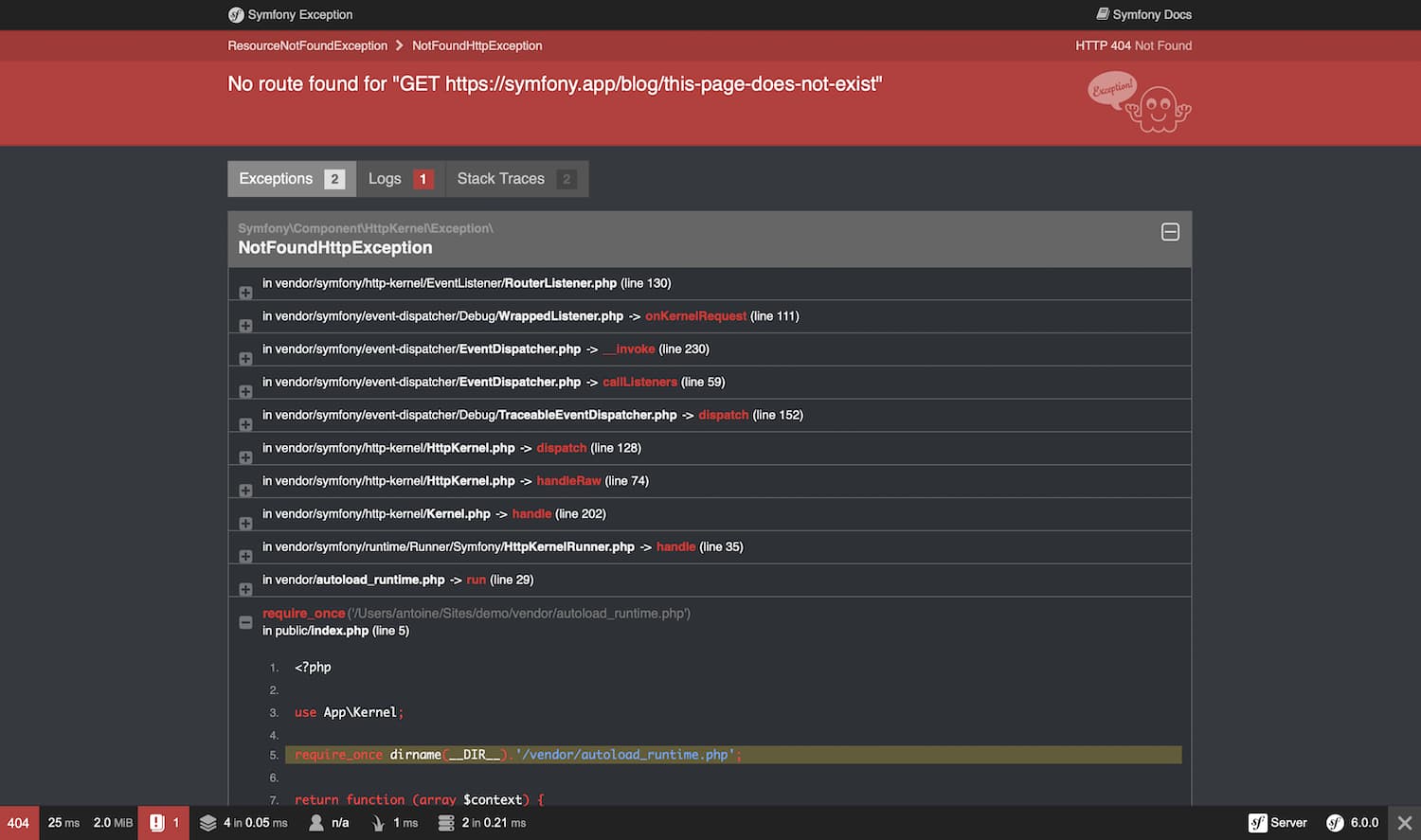
In the development environment,
Symfony catches all the exceptions and displays a special exception page
with lots of debug information to help you discover the root problem:
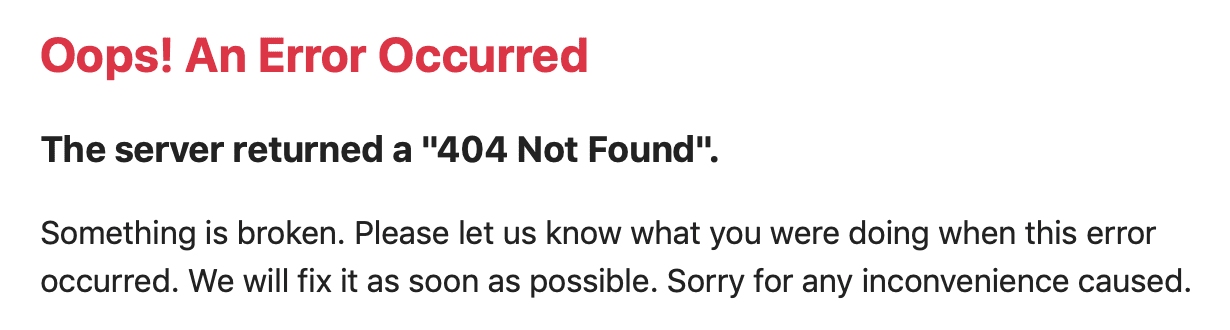
Since these pages contain a lot of sensitive internal information, Symfony won’t
display them in the production environment. Instead, it’ll show a minimal and
generic error page:
Error pages for the production environment can be customized in different ways
depending on your needs:
- If you only want to change the contents and styles of the error pages to match
the rest of your application, override the default error templates; - If you want to change the contents of non-HTML error output,
create a new normalizer; - If you also want to tweak the logic used by Symfony to generate error pages,
override the default error controller; - If you need total control of exception handling to run your own logic
use the kernel.exception event.
Overriding the Default Error Templates
You can use the built-in Twig error renderer to override the default error
templates. Both the TwigBundle and TwigBridge need to be installed for this. Run
this command to ensure both are installed:
When the error page loads, TwigErrorRenderer
is used to render a Twig template to show the user.
This renderer uses the HTTP status code and the following
logic to determine the template filename:
- Look for a template for the given status code (like
error500.html.twig); - If the previous template doesn’t exist, discard the status code and look for
a generic error template (error.html.twig).
To override these templates, rely on the standard Symfony method for
overriding templates that live inside a bundle and
put them in the templates/bundles/TwigBundle/Exception/ directory.
A typical project that returns HTML pages might look like this:
Example 404 Error Template
To override the 404 error template for HTML pages, create a new
error404.html.twig template located at templates/bundles/TwigBundle/Exception/:
In case you need them, the TwigErrorRenderer passes some information to
the error template via the status_code and status_text variables that
store the HTTP status code and message respectively.
Tip
You can customize the status code of an exception by implementing
HttpExceptionInterface
and its required getStatusCode() method. Otherwise, the status_code
will default to 500.
Additionally you have access to the HttpException
object via the exception Twig variable. For example, if the exception sets a
message (e.g. using throw $this->createNotFoundException('The product does not exist')),
use {{ exception.message }} to print that message. You can also output the
stack trace using {{ exception.traceAsString }}, but don’t do that for end
users because the trace contains sensitive data.
Tip
PHP errors are turned into exceptions as well by default, so you can also
access these error details using exception.
Security & 404 Pages
Due to the order of how routing and security are loaded, security information will
not be available on your 404 pages. This means that it will appear as if your
user is logged out on the 404 page (it will work while testing, but not on production).
Testing Error Pages during Development
While you’re in the development environment, Symfony shows the big exception
page instead of your shiny new customized error page. So, how can you see
what it looks like and debug it?
Fortunately, the default ErrorController allows you to preview your
error pages during development.
To use this feature, you need to load some special routes provided by FrameworkBundle
(if the application uses Symfony Flex they are loaded
automatically when installing symfony/framework-bundle):
With this route added, you can use URLs like these to preview the error page
for a given status code as HTML or for a given status code and format (you might
need to replace http://localhost/ by the host used in your local setup):
http://localhost/_error/{statusCode}for HTMLhttp://localhost/_error/{statusCode}.{format}for any other format
Overriding Error output for non-HTML formats
To override non-HTML error output, the Serializer component needs to be installed.
The Serializer component has a built-in FlattenException normalizer
(ProblemNormalizer) and
JSON/XML/CSV/YAML encoders. When your application throws an exception, Symfony
can output it in one of those formats. If you want to change the output
contents, create a new Normalizer that supports the FlattenException input:
Overriding the Default ErrorController
If you need a little more flexibility beyond just overriding the template,
then you can change the controller that renders the error page. For example,
you might need to pass some additional variables into your template.
To do this, create a new controller anywhere in your application and set
the framework.error_controller
configuration option to point to it:
The ErrorListener
class used by the FrameworkBundle as a listener of the kernel.exception event creates
the request that will be dispatched to your controller. In addition, your controller
will be passed two parameters:
exception- The original Throwable instance being handled.
logger-
A DebugLoggerInterface
instance which may benullin some circumstances.
Working with the kernel.exception Event
When an exception is thrown, the HttpKernel
class catches it and dispatches a kernel.exception event. This gives you the
power to convert the exception into a Response in a few different ways.
Working with this event is actually much more powerful than what has been explained
before, but also requires a thorough understanding of Symfony internals. Suppose
that your code throws specialized exceptions with a particular meaning to your
application domain.
Writing your own event listener
for the kernel.exception event allows you to have a closer look at the exception
and take different actions depending on it. Those actions might include logging
the exception, redirecting the user to another page or rendering specialized
error pages.
Note
If your listener calls setThrowable() on the
ExceptionEvent
event, propagation will be stopped and the response will be sent to
the client.
This approach allows you to create centralized and layered error handling:
instead of catching (and handling) the same exceptions in various controllers
time and again, you can have just one (or several) listeners deal with them.
Tip
See ExceptionListener
class code for a real example of an advanced listener of this type. This
listener handles various security-related exceptions that are thrown in
your application (like AccessDeniedException)
and takes measures like redirecting the user to the login page, logging them
out and other things.
Как настроить страницы ошибок
Дата обновления перевода: 2023-01-18
Как настроить страницы ошибок
В приложениях Symfony все ошибки воспринимаются, как исключения, вне зависимости
от того, являются ли они простой ошибкой 404 «Не найдено» или фатальной ошибкой,
запущенной вызовом какого-то исключения в вашем коде.
В окружении разработки, Symfony ловит все
исключения и отображаеть специальную страницу исключений со множеством информации
по отладке, чтобы помочь вам быстро обнаружить основную проблему:

Так как эти страницы содержат много чувствительной внутренней информации, Symfony
не будет отображать её в окружении производства. Вместо этого, она покажет простую
и общую ошибку страница ошибки:

Страницы ошибок в окружении производства можно настроить разными способами, в
зависимости от ваших потребностей:
- Если вы просто хотите изменить содержание и стили страниц ошибок так, чтобы
они совпадали с остальным вашим приложением,
переопределите шаблоны ошибок по умолчанию ; - Если вы хотите изменить содержание вывода ошибки не в HTML,
создайте новый нормализатор ; - Если вы также хотите настроить логику, используемую Symfony для генерирования ваших
страниц ошибок, то переопределите контроллер ошибок по умолчанию ; - Если вам нужен полный контроль над работой с исключениями, выполните вашу
собственную логику — используйте событие the kernel.exception .
Переопределение шаблонов ошибок по умолчанию
Вы можете использовать встроенное средство отображения ошибок Twig, чтобы переопределять
шаблоны ошибок по умолчанию. Для этого должны быть установлены как TwigBundle, так и TwigBridge.
Выполните эту команду, чтобы убедиться, что они оба установлены:
Когда загружается страница ошибки, для отображения шаблона twig и демонастрации
пользователю, используется TwigErrorRenderer.
Этот отображатель использует статус-код HTTP, формат запроса и следующую логику,
чтобы определить имя файла шаблона:
- Ищет шаблон для заданного статус-кода (вроде
error500.html.twig); - Если предыдущий шаблон не существует, отбросьте статус-код и ищет общий
шаблон ошибок (error.html.twig).
Чтобы переопределить эти шаблоны, просто положитесь на стандартный метод Symfony
для пеоепределения шаблонов, живущих внутри пакета:
поместите их в каталоге templates/bundles/TwigBundle/Exception/.
Типичный проект, возвращающий страницы HTML и JSON, может выглядеть так:
Пример шаблона ошибки 404
Чтобы переопределить шаблон ошибки 404 для HTML-страниц, создайте новый шаблон
error404.html.twig, находящийся в templates/bundles/TwigBundle/Exception/:
Если они вам понадобятся, TwigErrorRenderer передаёт некоторую информацию в шаблон
ошибок через переменные status_code и status_text, которые хранят HTTP статус-код
и сообщение соотвественно.
Tip
Вы можете настроить статус-код, реализовав
HttpExceptionInterface
и его обязательный метод getStatusCode(). В обратном случае, status_code
по умолчанию будет500.
Кроме этого у вас есть доступ к Исключениям с помощью exception, который, к примеру,
позволяет вам выводить отслеживание стека, используя {{ exception.traceAsString }}, или
получить доступ к любому другому методу объекта. Однако будьте аккуратны, так как это
с большой вероятностью может обнажить кофиденциальную информацию.
Tip
PHP-ошибки также по умолчанию превращаются в исключения, поэтому вы также можете
получить доступ к деталям этих ошибок, используя exception.
Безопасность и страницы 404
В связи с порядком, в котором загружаются маршрутизация и безопасность, конфиденциальна информация
не будет доступна на ваших страницах 404. Это означает, что будет казаться, что ваш пользователь
не залогинен в систему на странице 404 (это будет работать при тестировании, но не в производстве).
Тестирование страниц ошибок во время разработки
В то время, как вы находитесь в окружении разработки, Symfony отображает
большую страницу исключений вместо вашей новой блестящей страницы ошибок.
Так как вам увидеть, как она выглядит изнутри и отладить её?
К счастью, ExceptionController по умолчанию разрешает вам предпросмотр
вашей страницы ошибки во время разработки.
Чтобы использовать эту функцию, вам загрузить специальные маршруты, предоставленные
TwigBundle (если приложение использует Symfony Flex, то они
загружаются автоматически при установке symfony/framework-bundle):
- YAML
- XML
- PHP
C добавлением этого маршрута, вы можете использовать такие URL для предпросмотра
страницы ошибки для заданного статус-кода в виде HTML или для заданного статус-кода
и формата (вам может понадобиться заменить http://localhost/ на хостинг, используемый
в ваших локальных настройках):
http://localhost/_error/{statusCode}для HTMLhttp://localhost/_error/{statusCode}.{format}для любого другого формата
Переопределение вывода ошибок для не-HTML форматов
Чтобы переопределить не-HTML вывод ошибки, необходимо установить компонент Serializer.
Компонент Serializer имеет встроенный нормализатор FlattenException
(ProblemNormalizer) и кодировщики
JSON/XML/CSV/YAML. Когда ваше приложение вызывает исключение, Symfony может вывести его
в один из этих форматов. Если вы хоите изменить содержание вывода, создайте Нормализатор,
который поддерживает ввод FlattenException:
Переопределение ExceptionController по умолчаию
Если вам нужно немного больше гибкости кроме простого переопределения шаблона,
то вы можете изменить контроллер, отображающий странцу ошибки. Например, вам
может быть нужо передать дополнительные переменные в ваш шаблон.
Чтобы сделать это, просто создайте новый контролер где угодно в вашем приложении,
и установите опцию конфигурации framework.error_controller ,
чтобы указать на неё:
- YAML
- XML
- PHP
Класс ExceptionListener,
используемый TwigBundle в качестве слушателя события kernel.exception, создаёт
запрос, который будет развёрнут в вашем контроллере. В дополнение, вашему контроллеру
будут переданы два параметра:
exception- Обработка первоначального экземпляра Throwable.
logger-
Экемпляр DebugLoggerInterface,
который может в некоторых случаях бытьnull.
Tip
Предпросмотр страницы ошибки также работает
с вашими собственными контроллерами, нвстроенными как угодно.
Работа с событием kernel.exception
Когда вызывается исключение, класс HttpKernel
ловит его и развёртывает событие kernel.exception. Это даёт вам возможность
конвертировать исключение в Response несколькими разными способами.
Работа с этим событием на самом деле значительн более мощная, чем объяснялось раньше,
но также требует тщательного понимания внутренних процессов Symfony. Представьте, что
ваш код вызывает специальные исключения с конкретным значением в вашем домене приложения.
Написание вашего собственного слушателя событий для события
kernel.exception позволяет вам ближе рассмотретьисключение и предпринять по отношению
к нему разные действия. Эти действия могут включать в себя запись лога исключения,
перенаправление пользователя на другую страницу или отображение специальных страниц ошибки.
Note
Если ваш слушатель вызывает setResponse() в событии
ExceptionEvent,
распространение будет остановлено и клиенту будет отправлен ответ.
Этот подход позволяет вам создавать централизованную и многослойную обработку
ошибок: вместо того, чтобы ловить (и обрабатывать) одни и те же исключения в
разных контроллерах снова и снова, вы просто можете иметь одного (или нескольких)
слушателей, чтобы разбираться с ними.
Tip
Смотрите код класса ExceptionListener
для реального примера продвинутого слушателя такого типа. Этот слушатель обрабатывает
различные исключения, связанные с безопасностью, которые вызываются в вашем приложении
(как AccessDeniedException) и
предпринимает действия вроде перенаправления пользователей на страницу входа, выполняет
их вход в систему и др.
.. index::
   single: Controller; Customize error pages
   single: Error pages
How to Customize Error Pages
In Symfony applications, all errors are treated as exceptions, no matter if they
are just a 404 Not Found error or a fatal error triggered by throwing some
exception in your code.
If your app has the TwigBundle installed, a special controller handles these
exceptions. This controller displays debug information for errors and allows to
customize error pages, so run this command to make sure the bundle is installed:
$ composer require twig
In the :ref:`development environment <configuration-environments>`,
Symfony catches all the exceptions and displays a special exception page
with lots of debug information to help you discover the root problem:

Since these pages contain a lot of sensitive internal information, Symfony won’t
display them in the production environment. Instead, it’ll show a simple and
generic error page:

Error pages for the production environment can be customized in different ways
depending on your needs:
- If you just want to change the contents and styles of the error pages to match
the rest of your application, :ref:`override the default error templates <use-default-exception-controller>`; - If you also want to tweak the logic used by Symfony to generate error pages,
:ref:`override the default exception controller <custom-exception-controller>`; - If you need total control of exception handling to execute your own logic
:ref:`use the kernel.exception event <use-kernel-exception-event>`.
Overriding the Default Error Templates
When the error page loads, an internal :class:`Symfony\Bundle\TwigBundle\Controller\ExceptionController`
is used to render a Twig template to show the user.
This controller uses the HTTP status code, the request format and the following
logic to determine the template filename:
- Look for a template for the given format and status code (like
error404.json.twig
orerror500.html.twig); - If the previous template doesn’t exist, discard the status code and look for
a generic template for the given format (likeerror.json.twigor
error.xml.twig); - If none of the previous templates exist, fall back to the generic HTML template
(error.html.twig).
To override these templates, rely on the standard Symfony method for
:ref:`overriding templates that live inside a bundle <override-templates>` and
put them in the templates/bundles/TwigBundle/Exception/ directory.
A typical project that returns HTML and JSON pages might look like this:
templates/
└─ bundles/
   └─ TwigBundle/
      └─ Exception/
         ├─ error404.html.twig
         ├─ error403.html.twig
         ├─ error.html.twig      # All other HTML errors (including 500)
         ├─ error404.json.twig
         ├─ error403.json.twig
         └─ error.json.twig      # All other JSON errors (including 500)
Example 404 Error Template
To override the 404 error template for HTML pages, create a new
error404.html.twig template located at templates/bundles/TwigBundle/Exception/:
{# templates/bundles/TwigBundle/Exception/error404.html.twig #}
{% extends 'base.html.twig' %}

{% block body %}
    <h1>Page not found</h1>

    <p>
        The requested page couldn't be located. Checkout for any URL
        misspelling or <a href="{{ path('homepage') }}">return to the homepage</a>.
    </p>
{% endblock %}
In case you need them, the ExceptionController passes some information to
the error template via the status_code and status_text variables that
store the HTTP status code and message respectively.
Tip
You can customize the status code by implementing
:class:`Symfony\Component\HttpKernel\Exception\HttpExceptionInterface`
and its required getStatusCode() method. Otherwise, the status_code
will default to 500.
Note
The exception pages shown in the development environment can be customized
in the same way as error pages. Create a new exception.html.twig template
for the standard HTML exception page or exception.json.twig for the JSON
exception page.
Security & 404 Pages
Due to the order of how routing and security are loaded, security information will
not be available on your 404 pages. This means that it will appear as if your
user is logged out on the 404 page (it will work while testing, but not on production).
Testing Error Pages during Development
While you’re in the development environment, Symfony shows the big exception
page instead of your shiny new customized error page. So, how can you see
what it looks like and debug it?
Fortunately, the default ExceptionController allows you to preview your
error pages during development.
To use this feature, you need to load some special routes provided by TwigBundle
(if the application uses :ref:`Symfony Flex <symfony-flex>` they are loaded
automatically when installing Twig support):
.. configuration-block::

    .. code-block:: yaml

        # config/routes/dev/twig.yaml
        _errors:
            resource: '@TwigBundle/Resources/config/routing/errors.xml'
            prefix:   /_error

    .. code-block:: xml

        <!-- config/routes/dev/twig.xml -->
        <?xml version="1.0" encoding="UTF-8" ?>
        <routes xmlns="http://symfony.com/schema/routing"
            xmlns:xsi="http://www.w3.org/2001/XMLSchema-instance"
            xsi:schemaLocation="http://symfony.com/schema/routing
                https://symfony.com/schema/routing/routing-1.0.xsd">

            <import resource="@TwigBundle/Resources/config/routing/errors.xml" prefix="/_error"/>
        </routes>

    .. code-block:: php

        // config/routes/dev/twig.php
        use SymfonyComponentRoutingLoaderConfiguratorRoutingConfigurator;

        return function (RoutingConfigurator $routes) {
            $routes->import('@TwigBundle/Resources/config/routing/errors.xml')
                ->prefix('/_error')
            ;
        };
With this route added, you can use URLs like these to preview the error page
for a given status code as HTML or for a given status code and format.
http://localhost/index.php/_error/{statusCode}
http://localhost/index.php/_error/{statusCode}.{format}
Overriding the Default ExceptionController
If you need a little more flexibility beyond just overriding the template,
then you can change the controller that renders the error page. For example,
you might need to pass some additional variables into your template.
To do this, create a new controller anywhere in your application and set
the :ref:`twig.exception_controller <config-twig-exception-controller>`
configuration option to point to it:
.. configuration-block::

    .. code-block:: yaml

        # config/packages/twig.yaml
        twig:
            exception_controller: AppControllerExceptionController::showAction

    .. code-block:: xml

        <!-- config/packages/twig.xml -->
        <?xml version="1.0" encoding="UTF-8" ?>
        <container xmlns="http://symfony.com/schema/dic/services"
            xmlns:xsi="http://www.w3.org/2001/XMLSchema-instance"
            xmlns:twig="http://symfony.com/schema/dic/twig"
            xsi:schemaLocation="http://symfony.com/schema/dic/services
                https://symfony.com/schema/dic/services/services-1.0.xsd
                http://symfony.com/schema/dic/twig
                https://symfony.com/schema/dic/twig/twig-1.0.xsd">

            <twig:config>
                <twig:exception-controller>AppControllerExceptionController::showAction</twig:exception-controller>
            </twig:config>

        </container>

    .. code-block:: php

        // config/packages/twig.php
        $container->loadFromExtension('twig', [
            'exception_controller' => 'AppControllerExceptionController::showAction',
            // ...
        ]);
The :class:`Symfony\Component\HttpKernel\EventListener\ExceptionListener`
class used by the TwigBundle as a listener of the kernel.exception event creates
the request that will be dispatched to your controller. In addition, your controller
will be passed two parameters:
exception- A :class:`\Symfony\Component\Debug\Exception\FlattenException`
instance created from the exception being handled. logger- A :class:`\Symfony\Component\HttpKernel\Log\DebugLoggerInterface`
instance which may benullin some circumstances.
Instead of creating a new exception controller from scratch you can also extend
the default :class:`Symfony\Bundle\TwigBundle\Controller\ExceptionController`.
In that case, you might want to override one or both of the showAction() and
findTemplate() methods. The latter one locates the template to be used.
Note
In case of extending the
:class:`Symfony\Bundle\TwigBundle\Controller\ExceptionController` you
may configure a service to pass the Twig environment and the debug flag
to the constructor.
.. configuration-block::

    .. code-block:: yaml

        # config/services.yaml
        services:
            _defaults:
                # ... be sure autowiring is enabled
                autowire: true
            # ...

            AppControllerCustomExceptionController:
                public: true
                arguments:
                    $debug: '%kernel.debug%'

    .. code-block:: xml

        <!-- config/services.xml -->
        <?xml version="1.0" encoding="UTF-8" ?>
        <container xmlns="http://symfony.com/schema/dic/services"
            xmlns:xsi="http://www.w3.org/2001/XMLSchema-instance"
            xsi:schemaLocation="http://symfony.com/schema/dic/services
                https://symfony.com/schema/dic/services/services-1.0.xsd">

            <services>
                <!-- ... be sure autowiring is enabled -->
                <defaults autowire="true"/>
                <!-- ... -->

                <service id="AppControllerCustomExceptionController" public="true">
                    <argument key="$debug">%kernel.debug%</argument>
                </service>
            </services>

        </container>

    .. code-block:: php

        // config/services.php
        use AppControllerCustomExceptionController;

        $container->autowire(CustomExceptionController::class)
            ->setArgument('$debug', '%kernel.debug%');
Tip
The :ref:`error page preview <testing-error-pages>` also works for
your own controllers set up this way.
Working with the kernel.exception Event
When an exception is thrown, the :class:`Symfony\Component\HttpKernel\HttpKernel`
class catches it and dispatches a kernel.exception event. This gives you the
power to convert the exception into a Response in a few different ways.
Working with this event is actually much more powerful than what has been explained
before, but also requires a thorough understanding of Symfony internals. Suppose
that your code throws specialized exceptions with a particular meaning to your
application domain.
:doc:`Writing your own event listener </event_dispatcher>`
for the kernel.exception event allows you to have a closer look at the exception
and take different actions depending on it. Those actions might include logging
the exception, redirecting the user to another page or rendering specialized
error pages.
Note
If your listener calls setResponse() on the
:class:`Symfony\Component\HttpKernel\Event\ExceptionEvent`,
event, propagation will be stopped and the response will be sent to
the client.
This approach allows you to create centralized and layered error handling:
instead of catching (and handling) the same exceptions in various controllers
time and again, you can have just one (or several) listeners deal with them.
Tip
See :class:`Symfony\Component\Security\Http\Firewall\ExceptionListener`
class code for a real example of an advanced listener of this type. This
listener handles various security-related exceptions that are thrown in
your application (like :class:`Symfony\Component\Security\Core\Exception\AccessDeniedException`)
and takes measures like redirecting the user to the login page, logging them
out and other things.
В приложениях Symfony все ошибки рассматриваются как исключения Exception, независимо от того, являются ли они просто ошибкой 404 Not Found или фатальной ошибкой, вызванной возникновением некоторого исключения в вашем коде.
В среде разработки Symfony перехватывает все исключения и отображает специальную страницу исключений со множеством отладочной информации, которая поможет вам обнаружить корневую проблему:

Поскольку такие страницы содержат много конфиденциальной внутренней информации, Symfony не будет отображать их в production среде. Вместо этого он покажет простую и общую страницу ошибок:

Страницы ошибок для production среды могут быть настроены по-разному в зависимости от ваших потребностей:
- Если вы просто хотите изменить содержимое и стили страниц ошибок, чтобы они соответствовали остальной части вашего приложения, переопределите шаблоны ошибок по умолчанию;
- Если вы хотите изменить содержимое вывода ошибок, отличных от HTML, создайте новый нормализатор;
- Если вы также хотите настроить логику, используемую Symfony для генерации страниц ошибок, переопределите контроллер ошибок по умолчанию;
- Если вам нужен полный контроль над обработкой исключений для выполнения вашей собственной логики, используйте событие kernel.exception.
Как переопределить шаблон страницы ошибок по умолчанию?
Вы можете использовать встроенный обработчик ошибок Twig, чтобы переопределить шаблоны ошибок по умолчанию. Для этого должны быть установлены как TwigBundle, так и TwigBridge. Запустите эту команду, чтобы убедиться, что оба установлены:
Когда страница ошибки загружается, TwigErrorRenderer используется для визуализации шаблона Twig для отображения пользователю.
Этот рендерер использует код состояния HTTP и следующую логику для определения имени файла шаблона:
- Находится шаблон для данного кода состояния (например, error500.html.twig);
- Если предыдущий шаблон не существует, то игнорируется код состояния и находится общий шаблон ошибки (error.html.twig).
Чтобы переопределить эти шаблоны, используйте стандартный метод Symfony для переопределения шаблонов, которые находятся внутри пакета, и поместите их в каталог templates/bundles/TwigBundle/Exception/.
Типичный проект, который возвращает HTML-страницы, может выглядеть так:
templates/
└─ bundles/
   └─ TwigBundle/
      └─ Exception/
         ├─ error404.html.twig
         ├─ error403.html.twig
         └─ error.html.twig      # All other HTML errors (including 500)
Пример 404 Шаблона ошибки
Чтобы переопределить шаблон ошибки 404 для страниц HTML, создайте новый шаблон error404.html.twig, расположенный в шаблонах /bundles/TwigBundle/Exception /:
{# templates/bundles/TwigBundle/Exception/error404.html.twig #}
{% extends 'base.html.twig' %}

{% block body %}
    <h1>Page not found</h1>

    <p>
        The requested page couldn't be located. Checkout for any URL
        misspelling or <a href="{{ path('homepage') }}">return to the homepage</a>.
    </p>
{% endblock %}
Если вам потребуется, TwigErrorRenderer передает некоторую информацию в шаблон ошибки через переменные status_code и status_text, которые хранят код состояния HTTP и сообщение соответственно.
Вы можете настроить код состояния исключения, реализовав HttpExceptionInterface и его обязательный метод getStatusCode(). В противном случае код_состояния по умолчанию будет равен 500.
Тестирование страниц ошибок в режиме develop.
Пока вы находитесь в среде develop, Symfony показывает большую страницу исключений вместо вашей новой блестящей настраиваемой страницы ошибок. Итак, как вы можете увидеть, как это выглядит и отладить его?
К счастью, ErrorController по умолчанию позволяет вам просматривать страницы ошибок во время разработки.
Чтобы использовать эту функцию, вам нужно загрузить некоторые специальные маршруты, предоставляемые FrameworkBundle (если приложение использует Symfony Flex, они загружаются автоматически при установке symfony/framework-bundle):
# config/routes/dev/framework.yaml
_errors:
    resource: '@FrameworkBundle/Resources/config/routing/errors.xml'
    prefix:   /_error
После добавления этого маршрута вы можете использовать подобные URL-адреса для предварительного просмотра страницы ошибки для заданного кода состояния в виде HTML или для заданного кода состояния и формата.
http://localhost/index.php/_error/{statusCode}
http://localhost/index.php/_error/{statusCode}.{format}
Переопределение вывода ошибок для не-HTML форматов.
Чтобы переопределить вывод ошибок, в формате отличном от HTML, необходимо установить компонент Serializer.
composer require serializer
Компонент Serializer имеет встроенный нормализатор FlattenException (ProblemNormalizer) и енкодеры JSON / XML / CSV / YAML. Когда ваше приложение выдает исключение, Symfony может вывести его в одном из этих форматов. Если вы хотите изменить содержимое вывода, создайте новый нормализатор, который поддерживает вход FlattenException:
# src/App/Serializer/MyCustomProblemNormalizer.php
namespace AppSerializer;

use SymfonyComponentSerializerNormalizerNormalizerInterface;

class MyCustomProblemNormalizer implements NormalizerInterface
{
    public function normalize($exception, string $format = null, array $context = [])
    {
        return [
            'content' => 'This is my custom problem normalizer.',
            'exception'=> [
                'message' => $exception->getMessage(),
                'code' => $exception->getStatusCode(),
            ],
        ];
    }

    public function supportsNormalization($data, string $format = null)
    {
        return $data instanceof FlattenException;
    }
}
Переопределение стандартного ErrorController.
Если вам нужно немного больше гибкости, чем просто переопределение шаблона, вы можете изменить контроллер, отображающий страницу с ошибкой. Например, вам может потребоваться передать некоторые дополнительные переменные в ваш шаблон.
Для этого создайте новый контроллер в любом месте вашего приложения и установите параметр конфигурации framework.error_controller, чтобы он указывал на него:
# config/packages/framework.yaml
framework:
    error_controller: AppControllerErrorController::showAction
Класс ErrorListener, используемый FrameworkBundle в качестве прослушивателя события kernel.exception, создает запрос, который будет отправлен вашему контроллеру. Кроме того, вашему контроллеру будут переданы два параметра:
- exception — Экземпляр FlattenException, созданный из обрабатываемого исключения.
- logger — Экземпляр DebugLoggerInterface, который может быть null в некоторых случаях.
Вместо создания нового контроллера исключений с нуля вы также можете расширить ExceptionController по умолчанию. В этом случае вы можете переопределить один или оба метода showAction() и findTemplate(). Последний находит шаблон для использования.
В случае расширения ExceptionController вы можете настроить сервис для передачи окружения Twig и флага отладки в конструктор.
# config/services.yaml
services:
    _defaults:
        # ... be sure autowiring is enabled
        autowire: true
    # ...

    AppControllerCustomExceptionController:
        public: true
        arguments:
            $debug: '%kernel.debug%'
Работа с событием kernel.exception
Когда бросается exception, класс HttpKernel перехватывает его и отправляет событие kernel.exception. Это дает вам возможность преобразовать исключение в ответ несколькими различными способами.
Работа с этим событием на самом деле намного эффективнее, чем было объяснено ранее, но также требует глубокого понимания внутренних возможностей Symfony. Предположим, что ваш код выдает специализированные исключения с особым значением в область вашего приложения.
Написание собственного слушателя событий для события kernel.exception позволяет вам ближе рассмотреть исключение и предпринять различные действия в зависимости от него. Эти действия могут включать логирование исключения, редирект пользователя на другую страницу или отображение специализированных страниц с ошибками.
Если ваш слушатель вызывает setResponse() для ExceptionEvent, событие, дальнейшая обработка другими слушателями будет остановлено, и ответ будет отправлен клиенту.
Этот подход позволяет вам создавать централизованную и многоуровневую обработку ошибок: вместо того, чтобы снова и снова перехватывать (и обрабатывать) одни и те же исключения в различных контроллерах, вы можете иметь дело только с одним (или несколькими) слушателями.
I have this in my controller:
if(some stuff) {
    throw $this->createNotFoundException('message');
}
When I test it in dev env, I get the Symfony’s page telling Exception detected with my text, but I can’t test it in prod env  I run this
 php app/console cache:clear --env=prod --no-debug and then replace only in the URL app_dev.php with app.php but the toolbar and Symfony’s error page stay.
I created this file — app/Resources/TwigBundle/views/Exception/error.html.twig. So will it be rendered in prod?
This is in it:
<!DOCTYPE html>
<html>
<head>
    <meta http-equiv="Content-Type" content="text/html; charset=utf-8" />
    <title>An Error Occurred: {{ status_text }}</title>
</head>
<body>
    <h1>Oops! An Error Occurred</h1>
    <h2>The server returned a "{{ status_code }} {{ status_text }}".</h2>
</body>
</html>
where should I give values for status_code and status _text? Or they are taken from the exception?
So in general what I want to do is when a condition in my contoller`s action is true, mine customized error page to be shown in prod env. Did I make it already, and if not, how to make it and how to see the result in prod env?
asked Sep 28, 2012 at 6:49

I also tried and i noticed that custom error pages placed in app/Resources/TwigBundle/views/Exception/error.html.twig worked only in prod environment.
answered Oct 1, 2012 at 14:34

ChopchopChopchop
2,87918 silver badges36 bronze badges
3
Better late than never I guess..
You probably know about overriding of templates.
You can override any template you want.
So if you want to override the dev error page, just for debugging, then you should override the template:
exception_full.html.twig
You can do so by creating such a file in this folder:
app/Resources/TwigBundle/views/Exception
Now you will see your customized 404 in dev mode.
answered May 31, 2013 at 12:37

Jimmy KnootJimmy Knoot
2,37820 silver badges29 bronze badges
2
you can access your detected text with following way:
{{ exception.message }}
answered Nov 23, 2014 at 18:03

meteormeteor
6581 gold badge9 silver badges19 bronze badges
answered Sep 28, 2012 at 6:52

DarkLeafyGreenDarkLeafyGreen
69.1k130 gold badges382 silver badges599 bronze badges
4
It appears Symfony has a new way of allowing you to see the error page templates in your dev environment. Taken from their docs:
While you’re in the development environment, Symfony shows the big exception page instead of your shiny new customized error page. So, how can you see what it looks like and debug it?
Fortunately, the default ExceptionController allows you to preview your error pages during development.
To use this feature, you need to have a definition in your routing_dev.yml file like so:
# app/config/routing_dev.yml
_errors:
    resource: "@TwigBundle/Resources/config/routing/errors.xml"
    prefix:   /_error
Read more: Symfony Error Pages Manual

answered May 10, 2016 at 17:47

Shane NShane N
1,7422 gold badges17 silver badges24 bronze badges