
I have this problem, I already researched and I could not solve it, I imagine it has something to do with database permissions, but I can not fix it:
if (error) throw error;
       ^

Error: ER_ACCESS_DENIED_ERROR: Access denied for user ''@'localhost' (using password: NO)
at Handshake.Sequence._packetToError (/home/carlos/www/express-cc/node_modules/mysql/lib/protocol/sequences/Sequence.js:52:14)
at Handshake.ErrorPacket (/home/carlos/www/express-cc/node_modules/mysql/lib/protocol/sequences/Handshake.js:103:18)
at Protocol._parsePacket (/home/carlos/www/express-cc/node_modules/mysql/lib/protocol/Protocol.js:279:23)
at Parser.write (/home/carlos/www/express-cc/node_modules/mysql/lib/protocol/Parser.js:76:12)
at Protocol.write (/home/carlos/www/express-cc/node_modules/mysql/lib/protocol/Protocol.js:39:16)
at Socket.<anonymous> (/home/carlos/www/express-cc/node_modules/mysql/lib/Connection.js:103:28)
at emitOne (events.js:115:13)
at Socket.emit (events.js:210:7)
at addChunk (_stream_readable.js:266:12)
at readableAddChunk (_stream_readable.js:253:11)
--------------------
at Protocol._enqueue (/home/carlos/www/express-cc/node_modules/mysql/lib/protocol/Protocol.js:145:48)
at Protocol.handshake (/home/carlos/www/express-cc/node_modules/mysql/lib/protocol/Protocol.js:52:23)
at Connection.connect (/home/carlos/www/express-
cc/node_modules/mysql/lib/Connection.js:130:18)
at Object.<anonymous> (/home/carlos/www/express-cc/db.js:10:12)
at Module._compile (module.js:573:30)
at Object.Module._extensions..js (module.js:584:10)
at Module.load (module.js:507:32)
at tryModuleLoad (module.js:470:12)
at Function.Module._load (module.js:462:3)
at Module.require (module.js:517:17)
—- EDIT ——
my env.default file:
NODE_ENV=DEVELOPMENT

DB_HOST=localhost
DB_USER=user
DB_PASSWORD=userpass
DB_NAME=teste
so this my db.js file:
 var mysql = require('mysql')
  var connection = mysql.createConnection({
  host: process.env.DB_HOST,
  user: process.env.DB_USER,
  password: process.env.DB_PASSWORD,
  database : process.env.DB_NAME,
  sockertPath: '/var/run/mysqld/mysqld.sock'
})

 connection.connect()

 connection.query('SELECT 1 + 1 AS solution',
 function (error, results, fields) {
if (error) throw error;
console.log('The solution is: ', results[0].
  solution)
});

 module.exports = connection;
asked Sep 13, 2017 at 14:54
I had a similar problem, all my connections were working but where I got the error ‘ER_ACCESS_DENIED_ERROR: Access denied for user »@’localhost’ (using password: NO)‘ my call was made inside middleware at app.js level, so the .env values were not yet reachable, for this case (it could help those who have the same problem as me) I had to add:
require('dotenv').config();
Inside the connexion file like that :
const mysql = require('mysql')
require('dotenv').config();
const connectionLog = mysql.createPool({
    connectionLimit : 10,
    host: process.env.DB_HOST_LOG,
    user: process.env.DB_USER,
    password: process.env.DB_PASSWORD,
    database: process.env.DB_DATABASE,
    port:process.env.DB_PORT
})
For me it was the resolution.
answered Jan 27, 2021 at 15:09

You must create a MySQL user specifically to access the app. Create a user and set a password (do not leave the password null). Do not forget to give this user permission to be able to access the database and tables of app. I hope I have helped.
answered Sep 14, 2017 at 23:17

0
You didn’t provide db user:
Error: ER_ACCESS_DENIED_ERROR: Access denied for user ''@'localhost' (using password: NO)
answered Sep 13, 2017 at 14:58

michaJlSmichaJlS
2,4551 gold badge16 silver badges22 bronze badges
2
ALTER USER 'root'@'localhost' IDENTIFIED WITH mysql_native_password BY '';
then right after doing that command flushing the privileges by executing this command:
flush privileges;
answered Jan 17, 2020 at 18:04

ShedrackShedrack
6467 silver badges22 bronze badges
You had to add the new user with an IP of the allowed host section not of the name of «localhost»
RENAME USER 'myuser'@'localhost' TO 'myuser'@'127.0.0.1';
answered Dec 27, 2019 at 8:34

Jan BludauJan Bludau
3214 silver badges11 bronze badges
Solved it by using % in place of localhost:
CREATE USER 'user'@'%' IDENTIFIED WITH mysql_native_password BY 'password';
GRANT ALL PRIVILEGES ON db.* TO 'user'@'%';
instead of
CREATE USER 'user'@'localhost' IDENTIFIED WITH mysql_native_password BY 'password';
GRANT ALL PRIVILEGES ON db.* TO 'user'@'localhost';
answered Apr 26, 2021 at 2:40

hemant6488hemant6488
2773 silver badges11 bronze badges
Sometimes you face this error when you move your variables to .env file. In that case
- Install dotenv using npm or yarn add dotenv
- import .env using require(‘dotenv’).config();
After this you’d be able to read your ‘user’ environment variable
answered Nov 5, 2021 at 6:36

Check once if you’ve imported environment variables file before importing the db.js file or not.
Eg. —
Incorrect:
require("db.js");

const dotenv = require('dotenv');
dotenv.config({ path: 'env.default' });
Correct:
const dotenv = require('dotenv');
dotenv.config({ path: 'env.default' });

require("db.js");
So, first import env file, then db.js file.
answered Oct 20, 2021 at 16:39

1
In my case, adding a port number solves the problem ->
host:'localhost',
port:3406,
database:'demo_db',
user:'u_name',
password:'u_pass'
answered Feb 2, 2022 at 14:10

if you are using environment variables and dotenv library make sure that you add this require(‘dotenv’).config();……. just check it first…
const { createPool } = require(‘mysql’)
require(‘dotenv’).config();
const pool = createPool({
    port: process.env.DB_PORT,
    host: process.env.DB_HOST,
    user: process.env.DB_USERNAME,
    password: process.env.DB_PASSWORD,
    database: process.env.DB_DATABASE,
    waitForConnections: true,
    connectionLimit: 10,
    queueLimit: 0,
}).on("error", (err) => {
    console.log("Failed to connect to Database - ", err);
});


module.exports = pool;
answered Mar 13, 2022 at 5:59

First, you need to install env module and then create a root file .env mentioning the details of environment details:-
DB_NAME=yourdb_name
DB_HOST=localhost
DB_USER=root
DB_PASSWORD=""
PORT=8080 #port_no in which your code is executing

Tyler2P
2,30425 gold badges22 silver badges31 bronze badges
answered Sep 21, 2022 at 5:21

The way I fixed the problem was by moving the .env file.
As indicated, the user was blank '':
Access denied for user ''@'localhost'
That means the values from .env were not being accessed. As a test, I tried hardcoding the credentials directly into the connection configuration. It worked.
Then I moved the .env file and used the .env variables again. It worked.
Some apps require a certain folder structure. By conforming to the app’s recommended folder structure, I was able to get the app to read .env.
Also try running commands from the same folder where .env is located.
answered Dec 23, 2022 at 20:00

I had the same problem and my mistake was spaces in the config file…
Just as a try, you can try hard-coding your variables to test your code. If it works, there may be an issue with how your code is interacting with your config.ini source file.
Check that the path to the config.ini file is correct. In your example, you are using the relative path ../../private/config.ini, which means that the configuration file is two levels up from the currently executing PHP script. Make sure that this path is correct and that the configuration file is actually accessible from this location.
Check that the config.ini file uses the correct syntax for key-value pairs. Keys should be separated from values by an equal sign (=) and there should be no spaces before or after the equal sign. Values should be surrounded by double quotes («) if they contain spaces or special characters.
answered Mar 11 at 1:52

odgatelmandodgatelmand
3831 gold badge5 silver badges16 bronze badges
You can do the following :
mysql -u root -p
Enter password:
Create A User here and database here , After that use these details in your code.
i.e make a user by logging as root.
answered May 30, 2018 at 10:44

ERR_ACCESS_DENIED is no stranger to Windows PC users. This error often crops up when we try to access a web application. The root cause of this Error Code ERR_ACCESS_DENIED has usually misconfigured system files.
When ERR_ACCESS_DENIED appears on our screen, it could mean that the web page we are trying to access is temporarily down or moved to a new address permanently.
If you face this issue, there is no need to worry about it. This article will explore some of the most effective methods to get rid of this “ERR_ACCESS_DENIED” error in your browser.
Let’s get started.
What Does “ERR_ACCESS_DENIED” Mean?
The cause of the “ERR_ACCESS_DENIED” error code in the browser is still unknown, but some factors can result in this error.
Some of the common causes are listed below:
- Android Device error problem
- Blocked Internet TCP/UDP Port
- Google Chrome Windows error issue
- Rogue software is still running in the background
Let’s take a quick look at each of these causes one by one:
- Android Device error problem: Sometimes, your Android device can cause this error. This is because some Android devices do not support HTML5 or newer technologies.
- Blocked Internet TCP/UDP Port: One of the common causes of this error is a firewall or other security program blocking the required port for accessing the website. You will need to add an exception for the website in your firewall or security program.
- Google Chrome Windows error issue: Another common cause of this error is due to a conflict with Google Chrome on Windows. This can be caused by an outdated Chrome version or by a third-party program incompatible with Chrome.
- Rogue software still running in the background: Sometimes, this error can be caused by rogue software that is still running in the background even after you have closed all browser windows. This can happen if you have recently installed a new program and it did not properly clean up after itself.
Related: How to Fix Error 0xc0000022
Below are some tips on fixing and resolving the ERR_ACCESS_DENIED Windows error from your computer permanently.
Method 1: Run A Full PC Scan Through Windows Security App
While working on your computer, you may have encountered the ERR_ACCESS_DENIED error. This can be frustrating, especially if you don’t know how to fix it.
However, there is a simple solution: run a full PC scan through the Windows Security app. This will help to identify any potential problems with your system and correct them. The full PC scan can also help improve your computer’s performance by removing junk files and unwanted programs.
So if you’re getting the ERR_ACCESS_DENIED error, don’t despair – simply run a full PC scan, and here are a few simple steps.
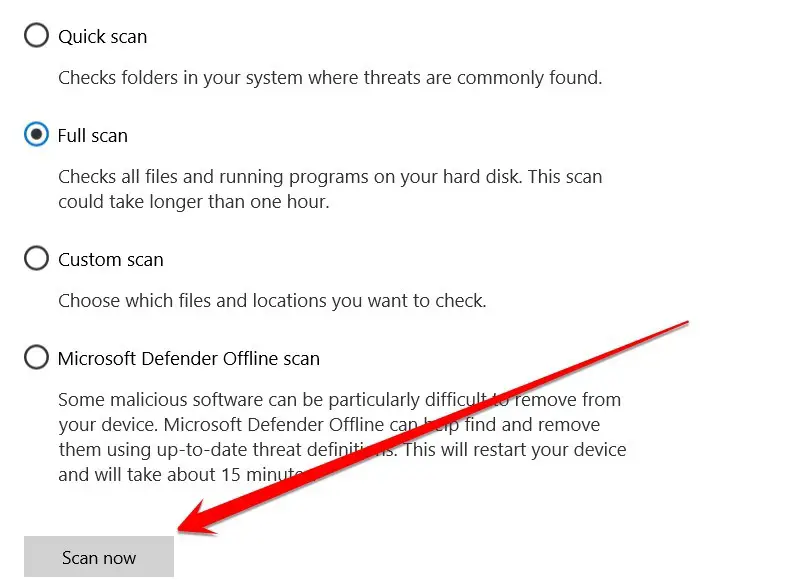
- Open the Windows Security app.
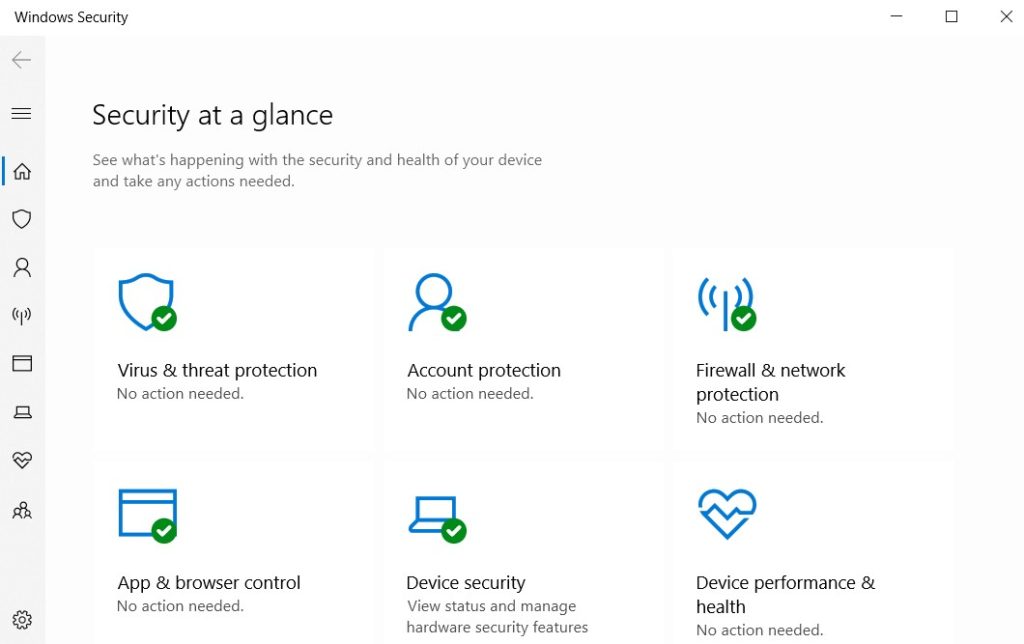
- Click on “Virus & threat protection.”
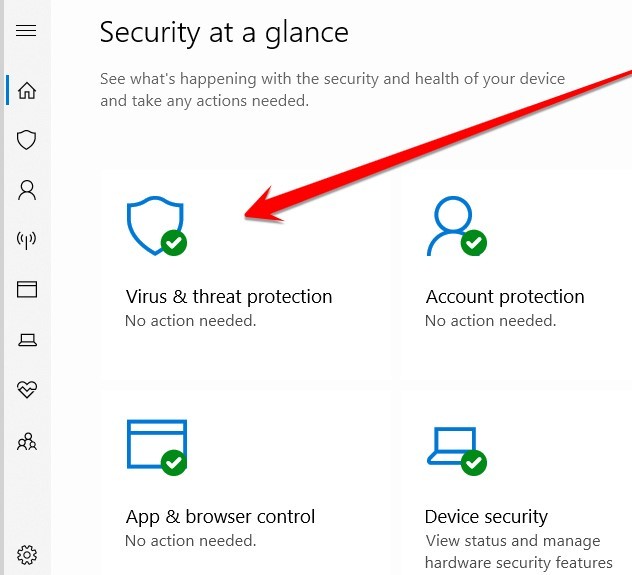
- Click “Scan Options.”
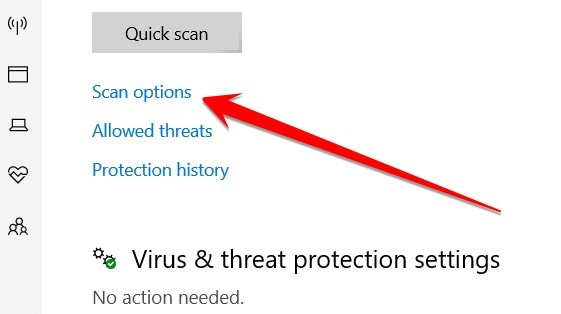
- Here, you see some scanning options. Select the “Full Scan” option.
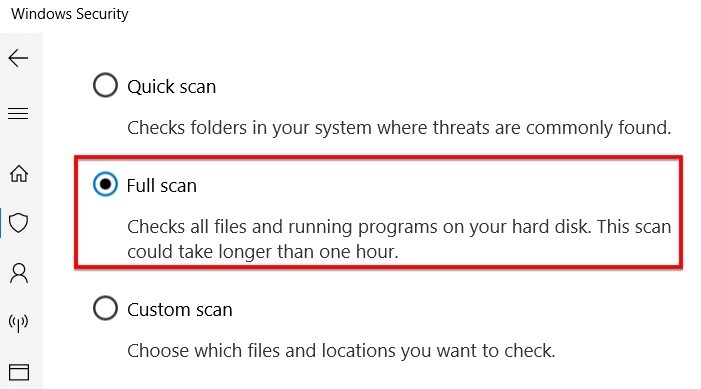
- In the final step, click on the “Scan now” option and wait for the compilation of this process. When the scanning process is complete, you need to restart your PC and check if this issue is solved or not. If you are still facing this issue, then follow the second method.
Method 2: Clear Browser Cache And Cookies
We all know the feeling: you’re trying to access a website, and you get that dreaded “ERR ACCESS DENIED” message. It’s frustrating, especially if you know you have the correct URL. And if your computer giving you the ERR_ACCESS_DENIED error when you try to access a website?
If so, there’s a good chance that the problem can be fixed by clearing your browser cache and cookies. Here’s how to do it:
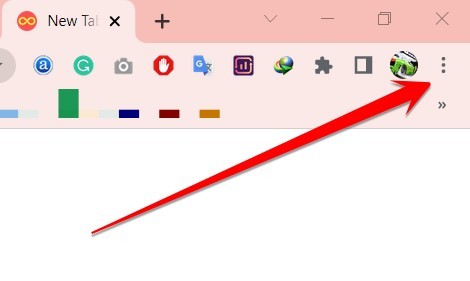
- First, open your browser and go to the settings menu. In most browsers, this can be done by clicking on the screen’s three dots in the top right-hand corner.
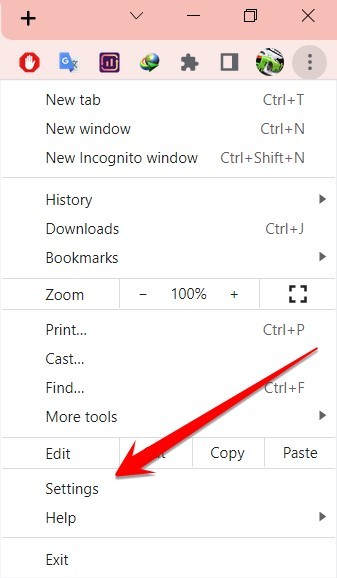
- From there, select “Settings” or “Preferences.”
- Once in the settings menu, type clear browser cache and cookies in the search bar.
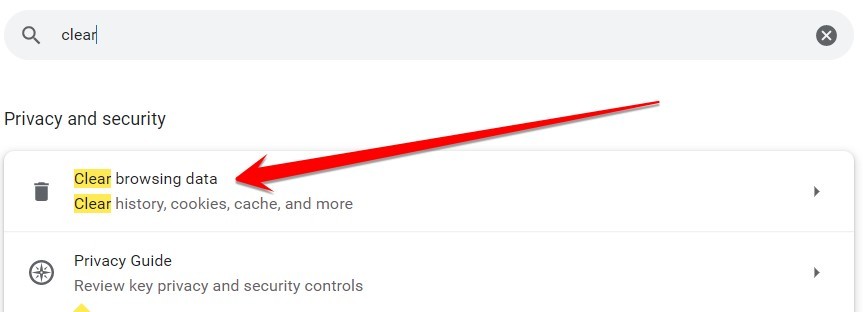
- This option is usually located under the privacy or security settings. Click on it, and then confirm that you want to clear your cache and cookies.
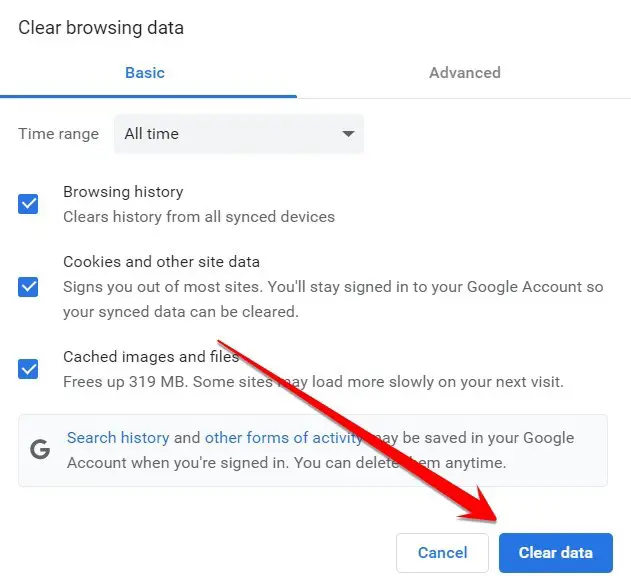
- This option is usually located under the privacy or security settings. Click on it, and then confirm that you want to clear your cache and cookies.
- After that, try accessing the website again. In most cases, this will fix the ERR_ACCESS_DENIED error and allow you to continue browsing without any problems.
Method 3: Disable Proxy Servers
Are you having trouble accessing certain websites? Do you keep getting the dreaded ERR_ACCESS_DENIED error message? If so, your proxy server likely is to blame.
A proxy server is a computer that acts as an intermediary between your computer and the internet. It can be used to improve security and performance, but it can also cause problems if not configured correctly.
In this case, the best solution is to disable the proxy server and see if that fixes the problem. Here’s how to do it:
- Open the Settings app and go to Network & Internet.
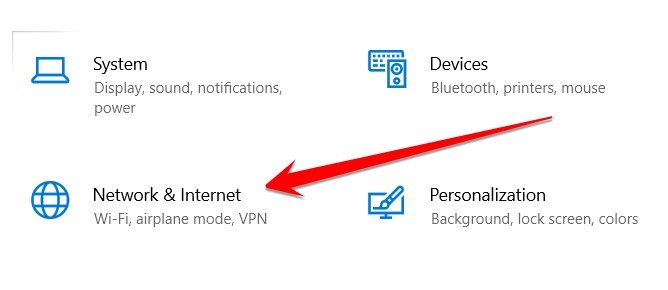
- Scroll down and click on Proxy.
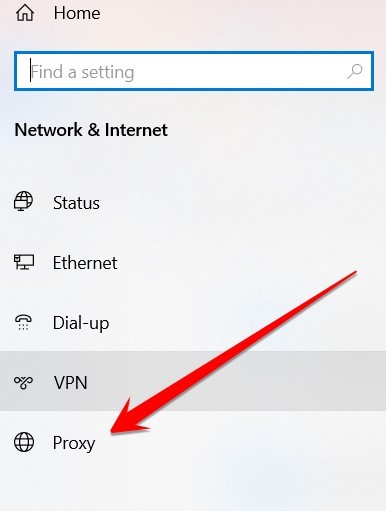
- Disable the Automatic proxy server.
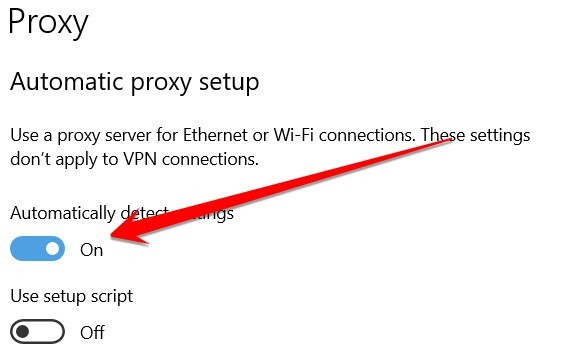
- Scroll down and click on Proxy.
- Disable the Automatic proxy server.
- Restart your browser and try accessing the website again.
Method 4: Reset the Chrome Browser
You’ve been using Chrome for a while now, and everything has been going great. But all of a sudden, you start getting the ERR_ACCESS_DENIED error when trying to access certain websites.
You’ve tried restarting your computer and even resetting your router, but nothing seems to be working. Fortunately, there is a way to Reset Chrome Browser and fix the ERR_ACCESS_DENIED error. Here’s what you need to do:
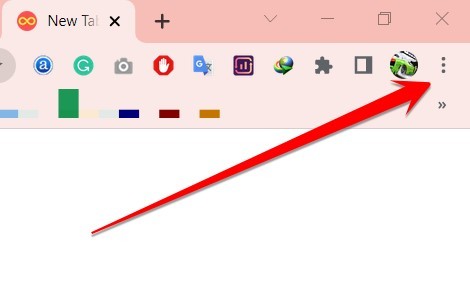
- Open the Chrome menu (the three dots in the browser’s top-right corner).
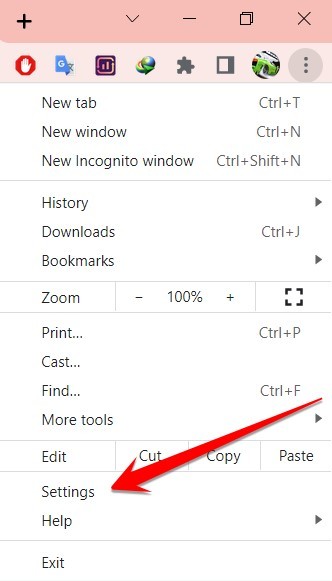
- Click on “Settings.”
- Type reset in the search bar.
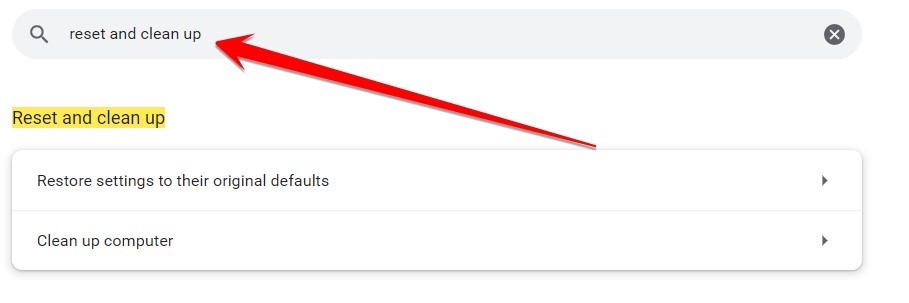
- Click on the “Reset” section, and then click on the “Reset setting” button.
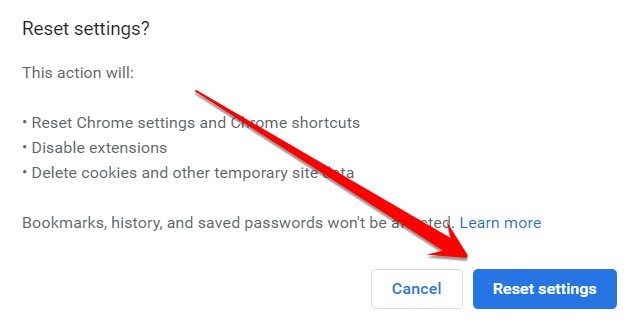
- A confirmation message will appear – click on ” Reset” again.
- Once the reset is complete, restart your browser and try accessing the website again.
With any luck, this will Reset Chrome Browser and fix the ERR_ACCESS_DENIED error. If not, something else may be happening with your computer or network, causing the problem. In that case, you may need to consult with a professional for further assistance.
Related: Fix: Allow Chrome To Access The Network In Your Firewall Or Antivirus Settings
Frequently Asked Questions
How Do You Fix You Don’t Have Permission To Access On This Server?
This common error can be caused by several things, including incorrect file permissions, an outdated .htaccess file, or a misconfigured server.
However, there are a few simple steps that you can take to fix the problem.
- First, check the file permissions on the server. If the permissions are set incorrectly, you may need to contact your hosting provider to correct them.
- Next, check the .htaccess file for any errors. You can delete the file or contact your hosting provider for help if there are any.
- In the final step, if all else fails, you may need to contact your hosting provider to troubleshoot the issue further. With a little effort, you should be able to fix the “you don’t have permission to access this server” error and get your website up and running again.
Why Do I Keep Getting Access Denied On Websites?
There are several reasons why you might be getting access denied on websites. It could be that the website is down for maintenance, or there may be an issue with your internet connection. However, it could also be that your ISP or government has blocked the website.
If you’re in a country with strict internet censorship, such as China or Iran, you’ll likely encounter this problem frequently. Even if you’re not in a censored country, you may still get access denied on websites if the site uses geo-blocking to restrict access to certain countries.
In any case, if you keep getting access denied on websites, there are a few things you can try. First, try using a VPN to bypass any restrictions that may be in place. If that doesn’t work, you can try contacting the website directly to see if they can give you access. Finally, if all else fails, you can try using Google Translate to view the website’s content.
How Do I Fix Access Denied On Windows 10?
You may be surprised that you can fix this problem by logging into your computer as an administrator. This will give you the necessary permissions to access the files and folders that you need.
If you are still having trouble, you can try resetting your permissions.
To do this, follow these steps:
- Go to the “Start” menu and type “cmd” into the search box.
- Right-click on the “Command Prompt” and select “Run as administrator.“
- Once you are in the command prompt, type “reset permissions,” and press Enter. This should fix the problem.
You can try running a virus scan if you are still having trouble. Sometimes, malware can prevent you from accessing certain files and folders. Running a virus scan can help remove any malicious software causing the problem.
Will I Lose Everything If I Reinstall Chrome?
No, you won’t lose any of your bookmarks or passwords because your bookmarks and passwords attach to your google email account. However, you will lose your browsing history, extensions, and themes.
So, if you’re considering reinstalling Chrome, you should first export your bookmarks to an HTML file. This way, you can easily import them after the reinstall. Your passwords are stored in your Google account, so you can easily retrieve them by visiting passwords.google.com.
Finally, if you’re using any Chrome-specific apps (like Gmail or Google Docs), you’ll need to re-install them after the fact. So, there’s no need to worry about losing everything if you decide to reinstall Chrome. Just be sure to export your bookmarks first!
How Do I Reset My Chrome Browser?
Well, let me tell you! It’s quite simple.
- First, go to your Settings.
- Once you’re in your settings, find the ‘Advanced‘ tab and click on it.
- Next, scroll down to the ‘Reset‘ section and click on the ‘Reset‘ button.
That’s it! Your Chrome browser will now be reset to its default settings. Of course, if you want to customize your browser again, you can always go back into your settings and change things to suit your needs. So there you have it – a quick and easy guide to resetting your Chrome browser.
How Do I Reinstall Chrome Without Losing Bookmarks And Passwords?
First, you’ll need to export your bookmarks from Chrome. To do this, follow these steps:
- Click the three-dot menu in the top right corner of Chrome and select “Bookmarks.”
- Click the “three-dot menu” again and select “Export bookmarks.” This will save your bookmarks as an HTML file on your computer.
- Next, you’ll need to uninstall Chrome from your computer. To do this, go to the “Control Panel” and select “Add or Remove Programs.”
- Find Chrome in the list of programs and click “Uninstall.” Once Chrome has been uninstalled, you can reinstall it from the Google website.
- When you reinstall Chrome, make sure to import your bookmarks by going to the “three-dot menu,” selecting “Bookmarks,” and then clicking “Import bookmarks.”
- This will ensure you don’t lose your bookmarks or passwords when reinstalling Chrome.
How Do I Fix The Access Denied Website?
Several reasons you may be getting access denied errors on websites, and each one requires a different solution. However, a few general tips can help you fix this problem.
- First, check to see if the website you’re trying to access is up and running. If it’s not, there’s nothing you can do to fix the access denied error.
- Second, try accessing the website from a different browser or device. Sometimes, access-denied errors are caused by browser-specific issues. Clearing your cache and cookies may also help.
- Finally, contact the website’s customer support team for assistance if you’re still having trouble. With these tips in mind, you should be able to fix the Access Denied error and get back to browsing the web without any trouble.
Conclusion
I’ve walked you through four methods to try if you’re experiencing the ERR_ACCESS_DENIED error code. Hopefully, one of these solutions has worked for you, and your computer is running smoothly again.
As always, feel free to contact me if you need assistance. Thanks for reading!
I have the same problem when I don’t use a password.
When I add a password, it recognizes my user (But of course it won’t connect since my db account don’t have password).
Im using:
- Nodejs 12.16.1 (LTS)
- Mysql module 12.16.1
- I’m using MariaDB 10.4.12 (It previously worked with 10.3 mariadb) it seems to be a MariaDB problem.
- Without password
Error: ER_DBACCESS_DENIED_ERROR: Access denied for user ''@'localhost' to database 'discord_bot_rpg'
    at Handshake.Sequence._packetToError (D:discordbotrpg-discordnode_modulesmysqllibprotocolsequencesSequence.js:47:14)
    at Handshake.ErrorPacket (D:discordbotrpg-discordnode_modulesmysqllibprotocolsequencesHandshake.js:123:18)
    at Protocol._parsePacket (D:discordbotrpg-discordnode_modulesmysqllibprotocolProtocol.js:291:23)
    at Parser._parsePacket (D:discordbotrpg-discordnode_modulesmysqllibprotocolParser.js:433:10)
    at Parser.write (D:discordbotrpg-discordnode_modulesmysqllibprotocolParser.js:43:10)
    at Protocol.write (D:discordbotrpg-discordnode_modulesmysqllibprotocolProtocol.js:38:16)
    at Socket.<anonymous> (D:discordbotrpg-discordnode_modulesmysqllibConnection.js:88:28)
    at Socket.<anonymous> (D:discordbotrpg-discordnode_modulesmysqllibConnection.js:526:10)
    at Socket.emit (events.js:200:13)
    at addChunk (_stream_readable.js:294:12)
    --------------------
    at Protocol._enqueue (D:discordbotrpg-discordnode_modulesmysqllibprotocolProtocol.js:144:48)
    at Protocol.handshake (D:discordbotrpg-discordnode_modulesmysqllibprotocolProtocol.js:51:23)
    at Connection.connect (D:discordbotrpg-discordnode_modulesmysqllibConnection.js:116:18)
    at Connection._implyConnect (D:discordbotrpg-discordnode_modulesmysqllibConnection.js:454:10)
    at Connection.query (D:discordbotrpg-discordnode_modulesmysqllibConnection.js:196:8)
    at internal/util.js:286:30
    at new Promise (<anonymous>)
    at Connection.query (internal/util.js:285:12)
    at Object.query (D:discordbotrpg-discordconfmysql.js:13:34)
    at ModuleHandler.loadPrefixes (D:discordbotrpg-discordsrcModulesModuleHandler.js:270:14) {
  code: 'ER_DBACCESS_DENIED_ERROR',
  errno: 1044,
  sqlMessage: "Access denied for user ''@'localhost' to database 'discord_bot_rpg'",
  sqlState: '42000',
  fatal: true
}

<-- HandshakeInitializationPacket {
  protocolVersion: 10,
  serverVersion: '5.5.5-10.4.12-MariaDB',
  threadId: 59,
  scrambleBuff1: <Buffer 43 40 55 69 34 65 22 73>,
  filler1: <Buffer 00>,
  serverCapabilities1: 63486,
  serverLanguage: 8,
  serverStatus: 2,
  serverCapabilities2: 33279,
  scrambleLength: 21,
  filler2: <Buffer 00 00 00 00 00 00 07 00 00 00>,
  scrambleBuff2: <Buffer 40 27 3f 46 26 26 2e 54 3d 72 49 53>,
  filler3: <Buffer 00>,
  pluginData: 'mysql_native_password',
  protocol41: true
}

--> (59) ClientAuthenticationPacket {
  clientFlags: 521167,
  maxPacketSize: 0,
  charsetNumber: 224,
  filler: undefined,
  user: 'discord_bot_rpg',
  scrambleBuff: <Buffer >,
  database: 'discord_bot_rpg',
  protocol41: true
}

<-- (59) ErrorPacket {
  fieldCount: 255,
  errno: 1044,
  sqlStateMarker: '#',
  sqlState: '42000',
  message: "Access denied for user ''@'localhost' to database 'discord_bot_rpg'"
}

Connection {
  _events: [Object: null prototype] {},
  _eventsCount: 0,
  _maxListeners: undefined,
  config: ConnectionConfig {
    host: 'localhost',
    port: 3306,
    localAddress: undefined,
    socketPath: undefined,
    user: 'discord_bot_rpg',
    password: undefined,
    database: 'discord_bot_rpg',
    connectTimeout: 10000,
    insecureAuth: false,
    supportBigNumbers: false,
    bigNumberStrings: false,
    dateStrings: false,
    debug: undefined,
    trace: true,
    stringifyObjects: false,
    timezone: 'local',
    flags: '',
    queryFormat: undefined,
    pool: undefined,
    ssl: false,
    localInfile: true,
    multipleStatements: true,
    typeCast: true,
    maxPacketSize: 0,
    charsetNumber: 224,
    clientFlags: 521167
  },
  _socket: undefined,
  _protocol: Protocol {
    _events: [Object: null prototype] {},
    _eventsCount: 0,
    _maxListeners: undefined,
    readable: true,
    writable: true,
    _config: ConnectionConfig {
      host: 'localhost',
      port: 3306,
      localAddress: undefined,
      socketPath: undefined,
      user: 'discord_bot_rpg',
      password: undefined,
      database: 'discord_bot_rpg',
      connectTimeout: 10000,
      insecureAuth: false,
      supportBigNumbers: false,
      bigNumberStrings: false,
      dateStrings: false,
      debug: undefined,
      trace: true,
      stringifyObjects: false,
      timezone: 'local',
      flags: '',
      queryFormat: undefined,
      pool: undefined,
      ssl: false,
      localInfile: true,
      multipleStatements: true,
      typeCast: true,
      maxPacketSize: 0,
      charsetNumber: 224,
      clientFlags: 521167
    },
    _connection: [Circular],
    _callback: null,
    _fatalError: null,
    _quitSequence: null,
    _handshake: false,
    _handshaked: false,
    _ended: false,
    _destroyed: false,
    _queue: [],
    _handshakeInitializationPacket: null,
    _parser: Parser {
      _supportBigNumbers: false,
      _buffer: <Buffer >,
      _nextBuffers: [BufferList],
      _longPacketBuffers: [BufferList],
      _offset: 0,
      _packetEnd: null,
      _packetHeader: null,
      _packetOffset: null,
      _onError: [Function: bound handleParserError],
      _onPacket: [Function: bound ],
      _nextPacketNumber: 0,
      _encoding: 'utf-8',
      _paused: false
    },
    [Symbol(kCapture)]: false
  },
  _connectCalled: false,
  state: 'disconnected',
  threadId: null,
  [Symbol(kCapture)]: false
}
- With password everything is fine user is detected
Error: ER_ACCESS_DENIED_ERROR: Access denied for user 'discord_bot_rpg'@'localhost' (using password: YES)
    at Handshake.Sequence._packetToError (D:discordbotrpg-discordnode_modulesmysqllibprotocolsequencesSequence.js:47:14)
    at Handshake.ErrorPacket (D:discordbotrpg-discordnode_modulesmysqllibprotocolsequencesHandshake.js:123:18)
    at Protocol._parsePacket (D:discordbotrpg-discordnode_modulesmysqllibprotocolProtocol.js:291:23)
    at Parser._parsePacket (D:discordbotrpg-discordnode_modulesmysqllibprotocolParser.js:433:10)
    at Parser.write (D:discordbotrpg-discordnode_modulesmysqllibprotocolParser.js:43:10)
    at Protocol.write (D:discordbotrpg-discordnode_modulesmysqllibprotocolProtocol.js:38:16)
    at Socket.<anonymous> (D:discordbotrpg-discordnode_modulesmysqllibConnection.js:88:28)
    at Socket.<anonymous> (D:discordbotrpg-discordnode_modulesmysqllibConnection.js:526:10)
    at Socket.emit (events.js:200:13)
    at addChunk (_stream_readable.js:294:12)
    --------------------
    at Protocol._enqueue (D:discordbotrpg-discordnode_modulesmysqllibprotocolProtocol.js:144:48)
    at Protocol.handshake (D:discordbotrpg-discordnode_modulesmysqllibprotocolProtocol.js:51:23)
    at Connection.connect (D:discordbotrpg-discordnode_modulesmysqllibConnection.js:116:18)
    at Connection._implyConnect (D:discordbotrpg-discordnode_modulesmysqllibConnection.js:454:10)
    at Connection.query (D:discordbotrpg-discordnode_modulesmysqllibConnection.js:196:8)
    at internal/util.js:286:30
    at new Promise (<anonymous>)
    at Connection.query (internal/util.js:285:12)
    at Object.query (D:discordbotrpg-discordconfmysql.js:14:34)
    at ModuleHandler.loadPrefixes (D:discordbotrpg-discordsrcModulesModuleHandler.js:270:14) {
  code: 'ER_ACCESS_DENIED_ERROR',
  errno: 1045,
  sqlMessage: "Access denied for user 'discord_bot_rpg'@'localhost' (using password: YES)",
  sqlState: '28000',
  fatal: true
}

<-- HandshakeInitializationPacket {
  protocolVersion: 10,
  serverVersion: '5.5.5-10.4.12-MariaDB',
  threadId: 60,
  scrambleBuff1: <Buffer 5d 67 6c 6b 52 3c 70 43>,
  filler1: <Buffer 00>,
  serverCapabilities1: 63486,
  serverLanguage: 8,
  serverStatus: 2,
  serverCapabilities2: 33279,
  scrambleLength: 21,
  filler2: <Buffer 00 00 00 00 00 00 07 00 00 00>,
  scrambleBuff2: <Buffer 3c 44 22 76 53 79 2c 68 4a 77 3d 64>,
  filler3: <Buffer 00>,
  pluginData: 'mysql_native_password',
  protocol41: true
}

--> (60) ClientAuthenticationPacket {
  clientFlags: 521167,
  maxPacketSize: 0,
  charsetNumber: 224,
  filler: undefined,
  user: 'discord_bot_rpg',
  scrambleBuff: <Buffer 7d 0d ed 2e fb db 05 7b d3 3b 11 66 e8 26 c6 85 8f 44 41 e0>,
  database: 'discord_bot_rpg',
  protocol41: true
}

<-- (60) ErrorPacket {
  fieldCount: 255,
  errno: 1045,
  sqlStateMarker: '#',
  sqlState: '28000',
  message: "Access denied for user 'discord_bot_rpg'@'localhost' (using password: YES)"
}
If you’re getting error 1045 that reads something like “Access denied for user ‘root’@’localhost’“, it’s because you’re trying to log in to MySQL without the right credentials.
This usually happens when we provide the wrong password. But there could also be another cause. For example, we could be trying to do something as the root user that requires a password, but the root user hasn’t yet had its password set.
To fix this issue, be sure to provide the correct password when connecting to MySQL.
Example of Error
Here’s an example of code that produces the error:
mysql -uhomer -pWrongPwdResult:
ERROR 1045 (28000): Access denied for user 'homer'@'localhost' (using password: YES)
In that example, I provided the wrong password.
Here’s another example that can cause the same error:
mysql_tzinfo_to_sql /usr/share/zoneinfo | mysql -u root -p mysqlResult:
ERROR 1045 (28000): Access denied for user 'root'@'localhost' (using password: YES)
Here I was trying to import named time zones into MySQL using the root user, and I provided a password, but the root user hadn’t yet had its password set.
Solution 1
The most obvious solution is to ensure that we pass the correct credentials when connecting to MySQL. In the first case above, I simply provided the wrong password.
Here’s an example of providing the correct password:
mysql -uhomer -pWheelyStrongPwdResult:
Welcome to the MySQL monitor.  Commands end with ; or g.
Your MySQL connection id is 80
Server version: 8.0.29 Homebrew

Copyright (c) 2000, 2022, Oracle and/or its affiliates.

Oracle is a registered trademark of Oracle Corporation and/or its
affiliates. Other names may be trademarks of their respective
owners.

Type 'help;' or 'h' for help. Type 'c' to clear the current input statement.
This time I was able to log in successfully using the homer account.
Solution 2
If you’re getting the error when trying to do something using the root user, it could be that the root user hasn’t yet had its password set.
In this case, set the password for the root user:
ALTER USER 'root'@'localhost' IDENTIFIED BY 'WheelyStrongPwd';Change WheelyStrongPwd to a really string password of your choosing.
Now when you try to log in as the root user, use the password that you set here.
Description
I installed Openstack Wallaby using OpenStack Installation Guide, all command and configuration is on my Github.
This LAB is running on VirtualBox and I have another LAB with the same configuration and Openstack version on ESXi without any problem.
At this point one controller with two compute node.
In the below section improve database permission confgured correctly
Databases are created properly:
user@controller001:~$ sudo mysql
MariaDB [(none)]> SHOW DATABASES;
+--------------------+
| Database           |
+--------------------+
| glance             |
| information_schema |
| keystone           |
| mysql              |
| nova               |
| nova_api           |
| nova_cell0         |
| performance_schema |
| placement          |
+--------------------+
Grant all permissions for those databases:
MariaDB [(none)]> SHOW GRANTS FOR nova;
+-----------------------------------------------------------------------------------------------------+
| Grants for nova@%                                                                                   |
+-----------------------------------------------------------------------------------------------------+
| GRANT USAGE ON *.* TO `nova`@`%` IDENTIFIED BY PASSWORD '*3A4A03AC22526F6B591010973A741D59A71D728E' |
| GRANT ALL PRIVILEGES ON `nova`.* TO `nova`@`%`                                                      |
| GRANT ALL PRIVILEGES ON `nova_cell0`.* TO `nova`@`%`                                                |
| GRANT ALL PRIVILEGES ON `nova_api`.* TO `nova`@`%`                                                  |
+-----------------------------------------------------------------------------------------------------+
Have access to databases remotely from compute node:
user@compute001:~$ mysql -unova -popenstack -h controller001

MariaDB [(none)]> show databases;
+--------------------+
| Database           |
+--------------------+
| information_schema |
| nova               |
| nova_api           |
| nova_cell0         |
+--------------------+
Mysql log after restarting nova services:
user@controller001:~$ sudo systemctl restart nova-*

user@controller001:~$ sudo tail -f /var/log/mysql/error.log
2021-10-02 12:52:12 112 [Warning] Aborted connection 112 to db: 'nova' user: 'nova' host: 'controller001' (Got an error reading communication packets)
2021-10-02 12:52:12 118 [Warning] Aborted connection 118 to db: 'nova_api' user: 'nova' host: 'controller001' (Got an error reading communication packets)
2021-10-02 12:52:12 116 [Warning] Aborted connection 116 to db: 'nova' user: 'nova' host: 'controller001' (Got an error reading communication packets)
2021-10-02 12:52:12 119 [Warning] Aborted connection 119 to db: 'nova_api' user: 'nova' host: 'controller001' (Got an error reading communication packets)
2021-10-02 12:52:12 115 [Warning] Aborted connection 115 to db: 'nova' user: 'nova' host: 'controller001' (Got an error reading communication packets)
2021-10-02 12:52:12 113 [Warning] Aborted connection 113 to db: 'nova' user: 'nova' host: 'controller001' (Got an error reading communication packets)
2021-10-02 12:52:12 114 [Warning] Aborted connection 114 to db: 'nova' user: 'nova' host: 'controller001' (Got an error reading communication packets)
2021-10-02 12:52:12 117 [Warning] Aborted connection 117 to db: 'nova' user: 'nova' host: 'controller001' (Got an error reading communication packets)
2021-10-02 12:52:12 109 [Warning] Aborted connection 109 to db: 'nova' user: 'nova' host: 'controller001' (Got an error reading communication packets)
2021-10-02 12:52:12 110 [Warning] Aborted connection 110 to db: 'nova' user: 'nova' host: 'controller001' (Got an error reading communication packets)
2021-10-02 12:52:12 111 [Warning] Aborted connection 111 to db: 'nova' user: 'nova' host: 'controller001' (Got an error reading communication packets)
2021-10-02 12:52:12 108 [Warning] Aborted connection 108 to db: 'nova_cell0' user: 'nova' host: 'controller001' (Got an error reading communication packets)
2021-10-02 12:52:12 103 [Warning] Aborted connection 103 to db: 'nova_api' user: 'nova' host: 'controller001' (Got an error reading communication packets)
2021-10-02 12:52:12 102 [Warning] Aborted connection 102 to db: 'nova_api' user: 'nova' host: 'controller001' (Got an error reading communication packets)
2021-10-02 12:52:12 105 [Warning] Aborted connection 105 to db: 'nova_cell0' user: 'nova' host: 'controller001' (Got an error reading communication packets)
2021-10-02 12:52:16 141 [Warning] Access denied for user 'nova'@'controller001' (using password: YES)
2021-10-02 12:52:16 142 [Warning] Access denied for user 'nova'@'controller001' (using password: YES)
2021-10-02 12:52:17 147 [Warning] Access denied for user 'nova'@'controller001' (using password: YES)
Got an error reading communication packets
Here are some suggestions to resolve this error:
SET GLOBAL max_allowed_packet = 1024 * 1024 * 256;
set @@global.max_connections = 400;
SET GLOBAL interactive_timeout=6000;
SET GLOBAL innodb_buffer_pool_size = 1024 * 1024 * 2;
Any try to discover new host make the below error:
user@controller001:~$ sudo su -s /bin/sh -c "nova-manage cell_v2 discover_hosts --verbose" nova
....
sqlalchemy.exc.OperationalError: (pymysql.err.OperationalError) (1045, "Access denied for user 'nova'@'controller001' (using password: YES)")
(Background on this error at: http://sqlalche.me/e/13/e3q8)
And, but I am not sure it is a bug or not
user@controller001:~$ os hypervisor list
Unexpected API Error. Please report this at http://bugs.launchpad.net/nova/ and attach the Nova API log if possible.
<class 'sqlalchemy.exc.OperationalError'> (HTTP 500) (Request-ID: req-d6edcfa3-ccf2-4eb8-80f8-041cb55e772d)
name configuration:
user@controller001:~$ . admin-openrc
user@controller001:~$ os endpoint list
+----------------------------------+-----------+--------------+--------------+---------+-----------+--------------------------------+
| ID                               | Region    | Service Name | Service Type | Enabled | Interface | URL                            |
+----------------------------------+-----------+--------------+--------------+---------+-----------+--------------------------------+
| 1e2f0fc829f84a53a337bbb70e7679af | RegionOne | nova         | compute      | True    | internal  | http://controller001:8774/v2.1 |
| 38e967a4c87f4464ba6ac965c889f6a4 | RegionOne | placement    | placement    | True    | admin     | http://controller001:8778      |
| 398d51ab439f4afc8fb7c71adc1bf3a9 | RegionOne | keystone     | identity     | True    | internal  | http://controller001:5000/v3/  |
| 4aaf9ac0ccec41978e541a0de0e55ed4 | RegionOne | nova         | compute      | True    | public    | http://controller001:8774/v2.1 |
| 52ba2047ed864b9aa6ad352ba2fe59dc | RegionOne | nova         | compute      | True    | admin     | http://controller001:8774/v2.1 |
| 659ed7ae84074b30a6a4941648b994c3 | RegionOne | placement    | placement    | True    | internal  | http://controller001:8778      |
| 9cd126c1f07e4b13946edcdc80f9f215 | RegionOne | placement    | placement    | True    | public    | http://controller001:8778      |
| aec5b18b834b4a9cad8a4efb83b1b1d7 | RegionOne | glance       | image        | True    | internal  | http://controller001:9292      |
| b1a13f51438c40b8b74ec25b89efebab | RegionOne | glance       | image        | True    | public    | http://controller001:9292      |
| c35c703090f3478aa7d960293fde1bf0 | RegionOne | keystone     | identity     | True    | admin     | http://controller001:5000/v3/  |
| ca231e48c3ad406c8ec757c765b651a6 | RegionOne | glance       | image        | True    | admin     | http://controller001:9292      |
| ff927678f6634475bd80bdba7effc3fc | RegionOne | keystone     | identity     | True    | public    | http://controller001:5000/v3/  |
+----------------------------------+-----------+--------------+--------------+---------+-----------+--------------------------------+
user@controller001:~$ sudo su -s /bin/sh -c "nova-manage cell_v2 list_cells" nova
+-------+--------------------------------------+---------------------------------------------+----------------------------------------------------+----------+
|  Name |                 UUID                 |                Transport URL                |                Database Connection                 | Disabled |
+-------+--------------------------------------+---------------------------------------------+----------------------------------------------------+----------+
| cell0 | 00000000-0000-0000-0000-000000000000 |                    none:/                   | mysql+pymysql://nova:****@controller001/nova_cell0 |  False   |
| cell1 | e62ffdc8-5f28-43ef-9bcb-404812faaeae | rabbit://openstack:****@controller001:5672/ |    mysql+pymysql://nova:****@controller001/nova    |  False   |
+-------+--------------------------------------+---------------------------------------------+----------------------------------------------------+----------+
user@controller001:~$ cat /etc/hosts
127.0.0.1 localhost
127.0.1.1 controller001

# The following lines are desirable for IPv6 capable hosts
::1     ip6-localhost ip6-loopback
fe00::0 ip6-localnet
ff00::0 ip6-mcastprefix
ff02::1 ip6-allnodes
ff02::2 ip6-allrouters

172.16.50.41    controller001
172.16.50.42    compute011